API explorer
Use API to inspect the API host, authentication flow and requests available for the selected context.
Note: Balancer is in beta. Endpoints, fields and behavior may change before general availability, and the feature must be enabled on your account before use. Contact your NetActuate account manager to request access.
API explorer
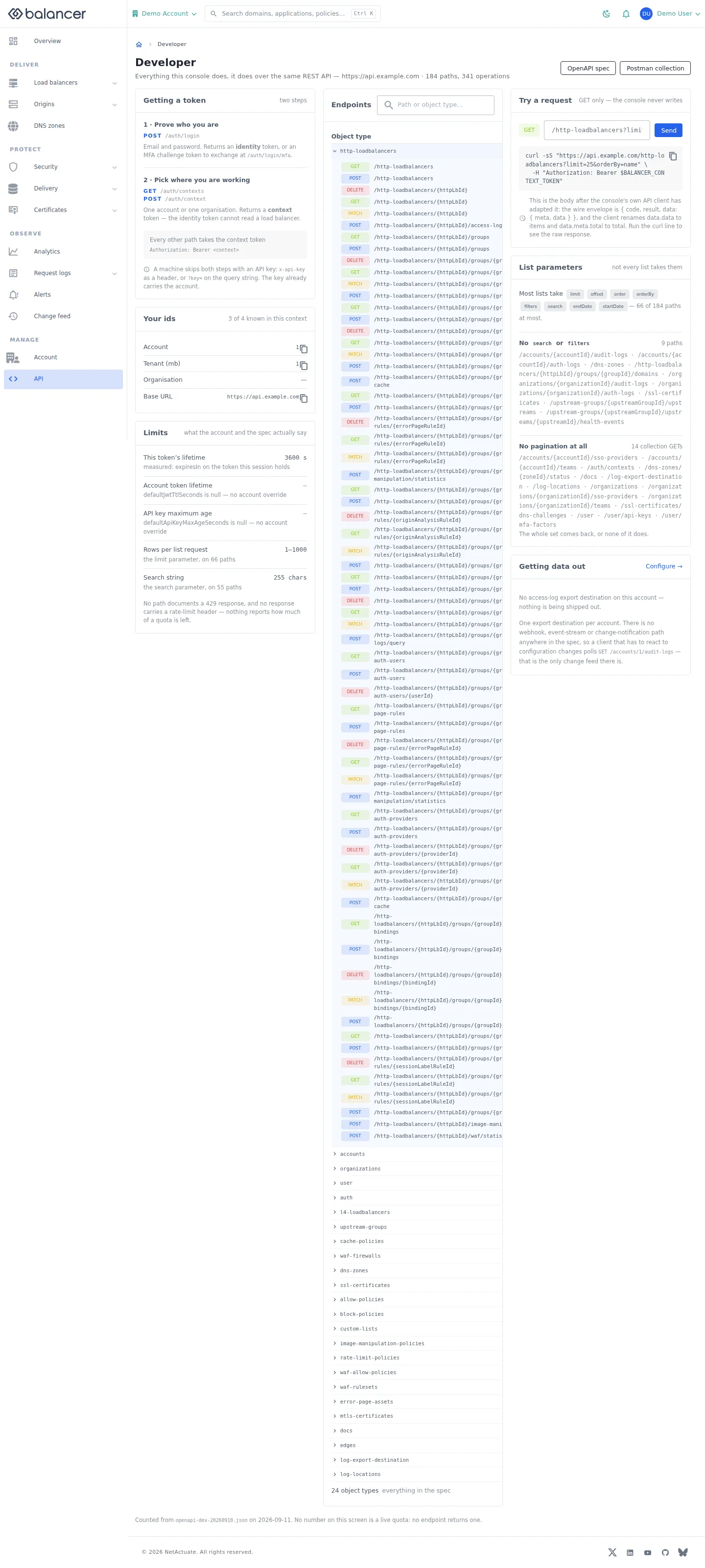
Find the API host, authentication flow and operations used by the portal.
- Open API. Copy the API host shown in the portal for your API client.
- Choose an operation to inspect its parameters. Select Send only after reviewing the method and payload.
- Review the displayed response. Use OpenAPI spec or Postman collection for the downloadable definitions.
Verify with the API
Use the API host shown in the Balancer portal in place of https://<your-api-host>. Set $BALANCER_API_KEY to your credential for this context.
curl --fail-with-body --silent --show-error --request GET \
  --url "https://<your-api-host>/http-loadbalancers" \
  --header "x-api-key: $BALANCER_API_KEY"
Expect HTTP 200 with code set to 200. The response includes data.meta, data.data[], data.meta.total, data.meta.offset. Compare the returned configuration with the screen. A successful configuration read does not verify that an edge has applied it.
API reference: List HTTP load balancers associated with your account.