Origins and health checks
Use Origins to manage upstream groups, add origin members and inspect health checks.
Note: Balancer is in beta. Endpoints, fields and behavior may change before general availability, and the feature must be enabled on your account before use. Contact your NetActuate account manager to request access.
Before you begin
Choose the account that owns the resources. Use a credential with write access when changing configuration.
Upstream groups
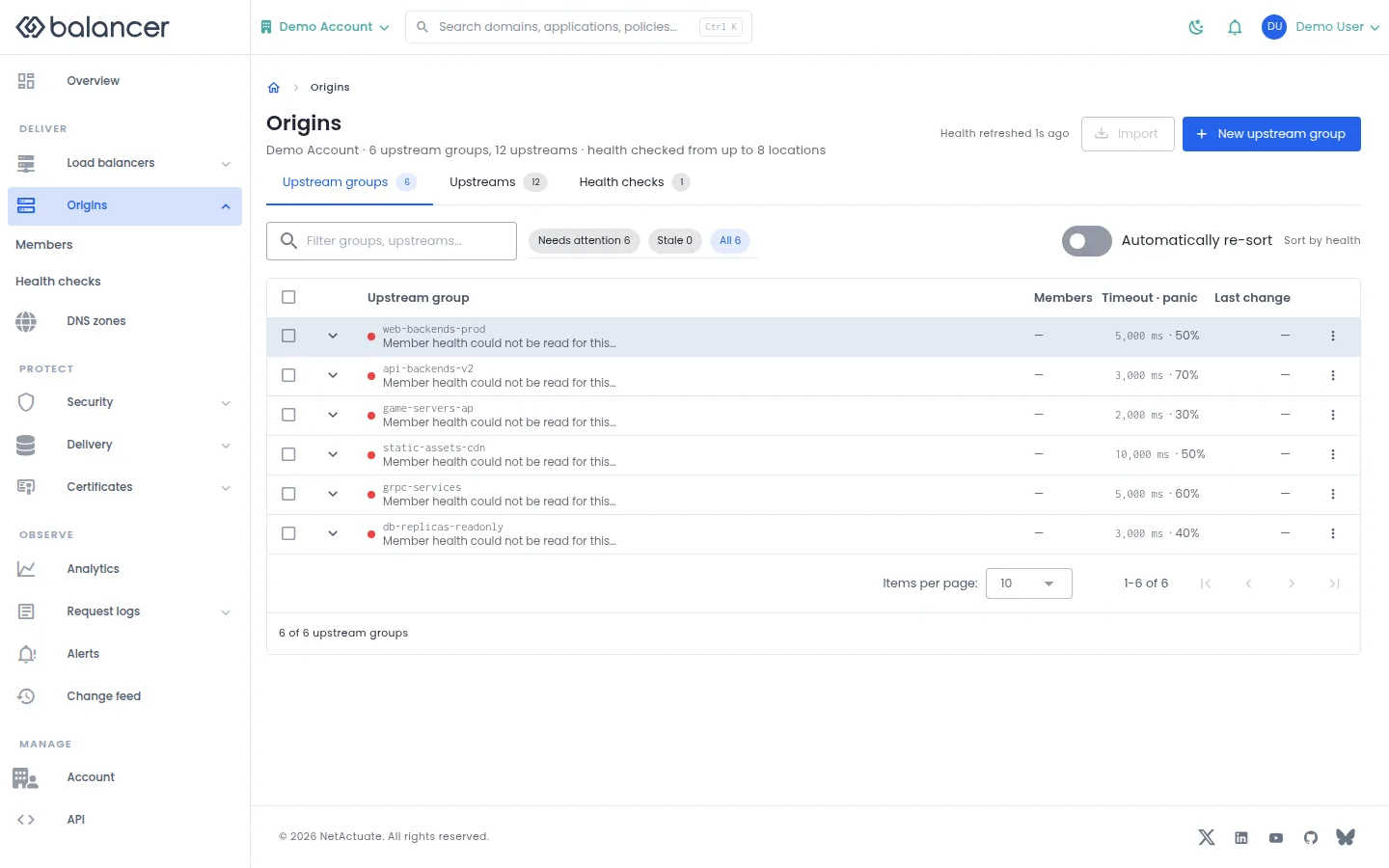
Manage reusable pools of origin servers.
- Open Origins, then Upstream groups.
- Select New upstream group to create a pool, or open an existing pool.
- Use Automatically re-sort to control list reordering. Verify the pool before binding it to an application or route.
Verify with the API
Use the API host shown in the Balancer portal in place of https://<your-api-host>. Set $BALANCER_API_KEY to your credential for this context.
curl --fail-with-body --silent --show-error --request GET \
  --url "https://<your-api-host>/upstream-groups" \
  --header "x-api-key: $BALANCER_API_KEY"
Expect HTTP 200 with code set to 200. The response includes data.meta.total, data.meta.offset, data.meta.limit, data.meta.suggestedFilters. Compare the returned configuration with the screen. A successful configuration read does not verify that an edge has applied it.
API reference: List upstream groups associated with your account.
Create or edit an upstream group
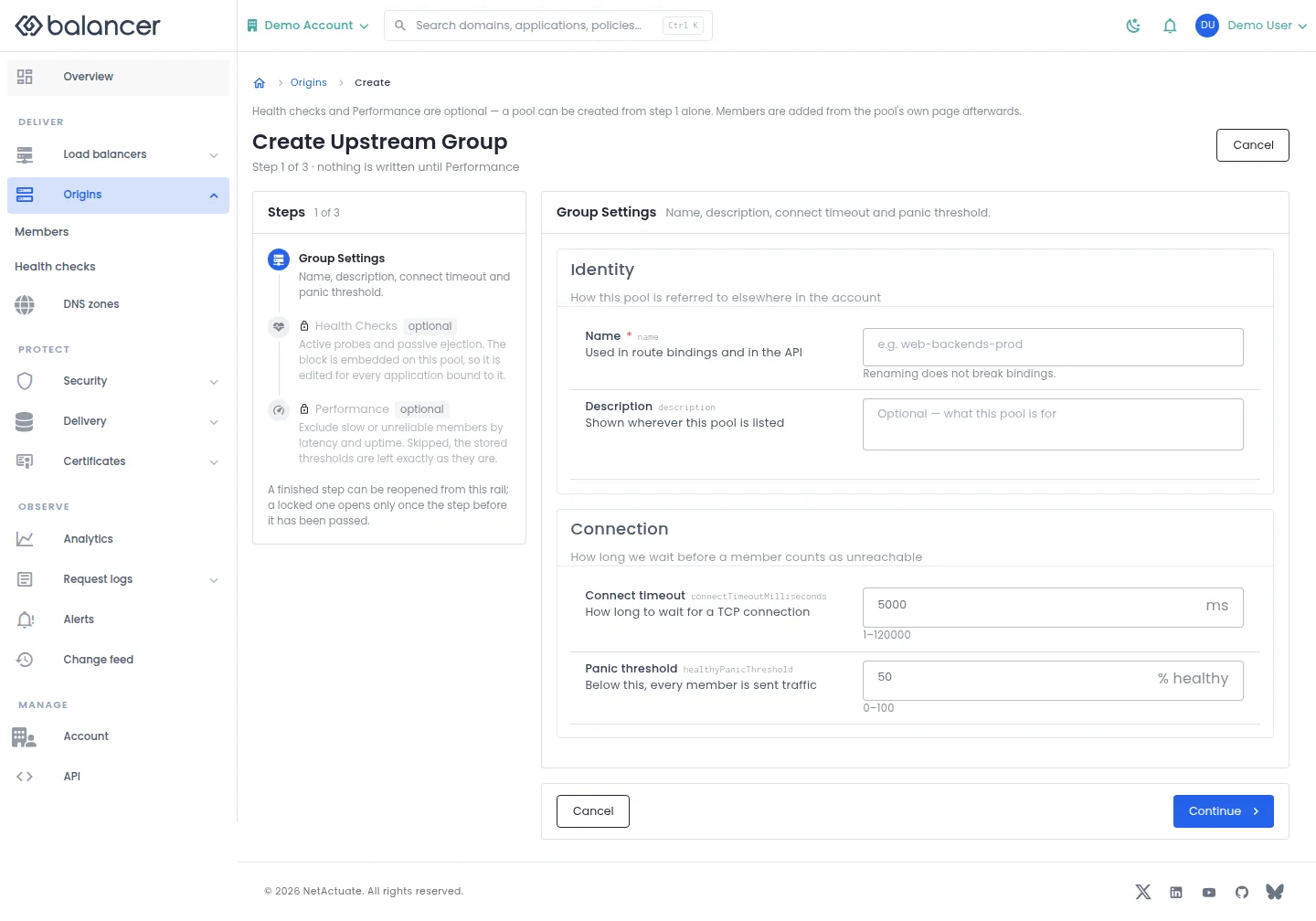
Configure pool identity, connection behavior, health checks and performance thresholds. Members are added from the pool page.
- Select New upstream group or Edit group. Enter Name and optional Description, Connect timeout and Panic threshold.
- Select Continue to review Health Checks and Performance. These steps are optional; review the final action before saving.
- Select Create Upstream Group when creating or Save Changes when editing. Reopen the pool to verify the saved settings. When editing, skipped performance settings retain their stored values.
| Field | Required | Description | Matching API field |
|---|---|---|---|
| Name | Yes | Used in route bindings and in the API. Renaming does not break bindings. | name |
| Description | No | Shown wherever this pool is listed | description |
| Connect timeout | No | How long to wait for a TCP connection. 1-120000 API default: 5000 ms. | connectTimeoutMilliseconds |
| Panic threshold | No | Below this, every member is sent traffic. 0-100 API default: 50%. | healthyPanicThreshold |
| Active probing | No | Probe each member from every location | healthCheck.active.enabled |
| Type | No | How each location probes the member | healthCheck.active.type |
| Path | No | Requested on every probe | healthCheck.active.path |
| Host header | No | Sent with the probe | healthCheck.active.domain |
| Probe port | No | Defaults to the member port | healthCheck.active.port |
| Method | No | GET reads the body; HEAD does not | healthCheck.active.httpMethod |
| Expected status | No | The response codes that count as passing | healthCheck.active.httpAllowedStatusCodes |
| Body must contain | No | Checked only when the status passes | healthCheck.active.matchHttpString |
| Interval | No | Between probes, from each location | healthCheck.active.intervalSeconds |
| Timeout | No | A probe that takes longer has failed | healthCheck.active.timeoutMilliseconds |
| Failures to eject | No | In a row, at one location | healthCheck.active.minimumConsecutiveFailures |
| Successes to restore | No | In a row, at one location | healthCheck.active.minimumConsecutiveSuccesses |
| Tries per check | No | Retries inside a single probe | healthCheck.active.triesPerCheck |
| Retry delay | No | Between tries inside one probe | healthCheck.active.retryDelaySeconds |
| Follow redirects | No | 0 means a redirect is a failure | healthCheck.active.maxRedirects |
| Probe over TLS | No | The probe itself, not traffic to the member | healthCheck.active.enableSsl |
| Accept an untrusted certificate | No | On the probe connection only | healthCheck.active.allowInsecureHttps |
| Client certificate | No | Presented by the probe | healthCheck.active.mtlsClientCertificateId |
| Agreement between locations | No | How many locations must agree a member is dead | healthCheck.active.localityRequirement |
| Answer must contain the member IP | No | DNS probes only | healthCheck.active.dnsRequireUpstreamIp |
| Eject on live traffic errors | No | On real requests, between active probes | healthCheck.passive.enabled |
| Consecutive 5xx | No | Before the member is ejected | healthCheck.passive.maxFails |
| Ejection time | No | Restored by the next passing probe | healthCheck.passive.failDuration |
| Failure window | No | The window the failures are counted in | healthCheck.passive.maxFailDurationMs |
| Statuses that count | No | Blank means every 5xx | healthCheck.passive.statuses |
| Exclusion on | No | Makes a member ineligible, not unhealthy | performanceThresholds.enabled |
| Must satisfy | No | Which thresholds a member has to meet | performanceThresholds.upstreamFiltering |
| Exclude missing reports | No | Left out of the window, not read as zero | performanceThresholds.excludeMissingReports |
| Probe window | No | Set the displayed option.. 1-10080 | performanceThresholds.probeWindowMinutes |
| Keep fastest | No | Set the displayed option.. 1-100 | performanceThresholds.minimumResponseTimePercent |
| Slowest allowed | No | Set the displayed option.. 1-300000 | performanceThresholds.maximumResponseTimeMs |
| Minimum uptime | No | Set the displayed option.. 1-100 | performanceThresholds.minimumUptimePercent |
API equivalent
Create an upstream group with the API defaults: connect timeout 5000 ms and panic threshold 50%. Use the API host shown in the Balancer portal in place of https://<your-api-host>. Set $BALANCER_API_KEY to your credential for this context.
curl --fail-with-body --silent --show-error --request POST \
  --url "https://<your-api-host>/upstream-groups" \
  --header "x-api-key: $BALANCER_API_KEY" \
  --header "Content-Type: application/json" \
  --data '{"name":"example.com"}'
Expect HTTP 200 with code set to 200. The response acknowledges the stored change. Reopen the portal screen or run the read example below to verify it.
API reference: Creates a new upstream group (backend pool).
Verify with the API
Use the API host shown in the Balancer portal in place of https://<your-api-host>. Set $BALANCER_API_KEY to your credential for this context.
curl --fail-with-body --silent --show-error --request GET \
  --url "https://<your-api-host>/upstream-groups" \
  --header "x-api-key: $BALANCER_API_KEY"
Expect HTTP 200 with code set to 200. The response includes data.meta.total, data.meta.offset, data.meta.limit, data.meta.suggestedFilters. Compare the returned configuration with the screen. A successful configuration read does not verify that an edge has applied it.
API reference: List upstream groups associated with your account.
Upstream group members
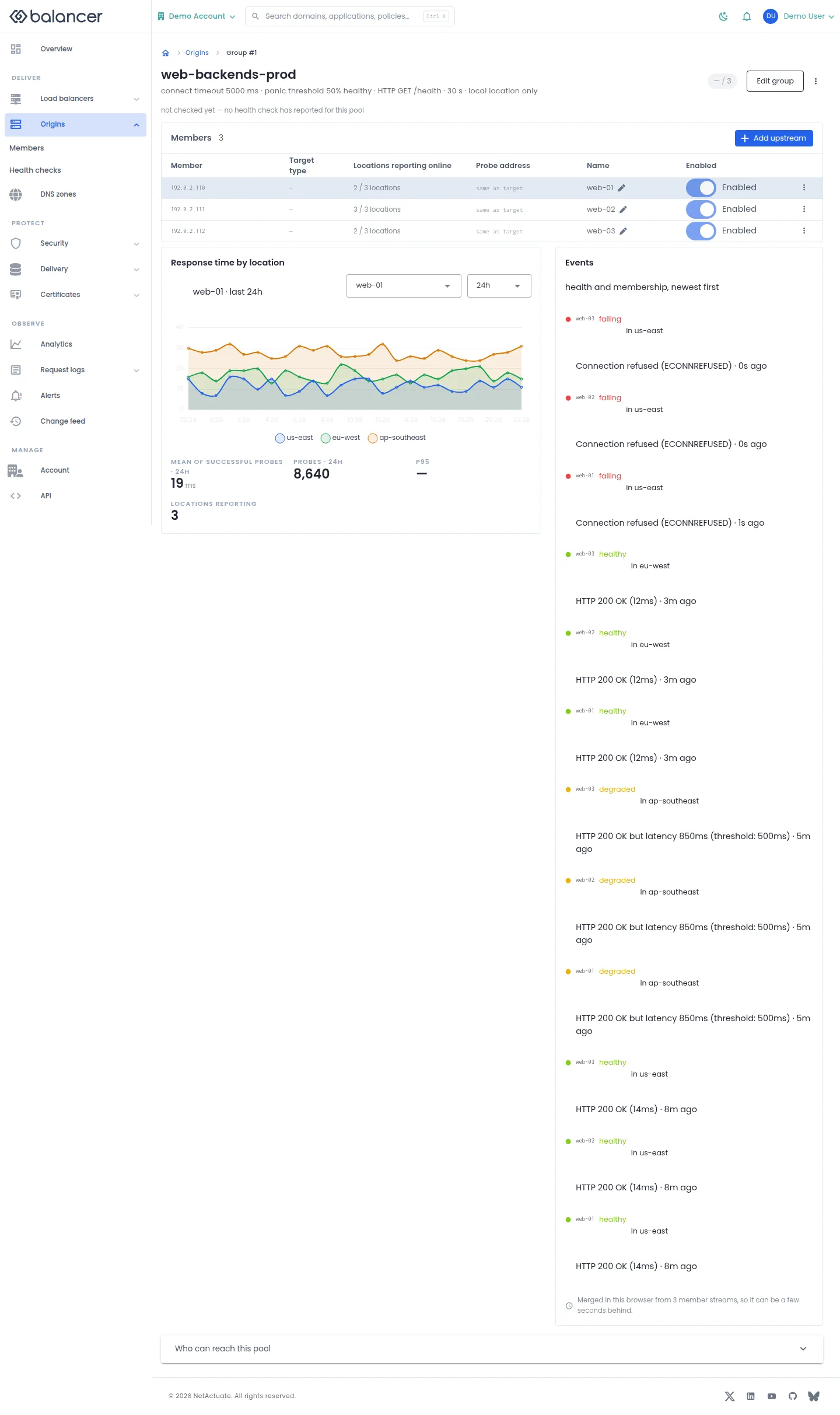
Manage pool members and review health measurements and events.
- Open an upstream group. Select Add upstream, enter the target and optional metadata, then submit.
- Verify the member in Members. Use Enabled to change whether the member is selected.
- Select Edit group for pool settings. Review Who can reach this pool before changing access.
| Field | Required | Description | Matching API field |
|---|---|---|---|
| Reached by | Yes | IP address or Hostname. Target type is fixed at creation. | targetType |
| IP address | For IP targets | Valid IP address. | address |
| Hostname | For hostname targets | Origin hostname. | domain |
| Name | No | Up to 64 characters. | name |
| Health check address | No | Alternate address used for probes. | healthCheckExternalAddress |
Verify with the API
Use the API host shown in the Balancer portal in place of https://<your-api-host>. Set $BALANCER_API_KEY to your credential for this context. Set $UPSTREAM_GROUP_ID to the resource identifiers you want to inspect.
curl --fail-with-body --silent --show-error --request GET \
  --url "https://<your-api-host>/upstream-groups/$UPSTREAM_GROUP_ID" \
  --header "x-api-key: $BALANCER_API_KEY"
Expect HTTP 200 with code set to 200. The response includes data.upstreamGroupId, data.name, data.description, data.connectTimeoutMilliseconds. Compare the returned configuration with the screen. A successful configuration read does not verify that an edge has applied it.
API reference: Get an upstream group.
Create or edit an upstream group (alternate view 2)
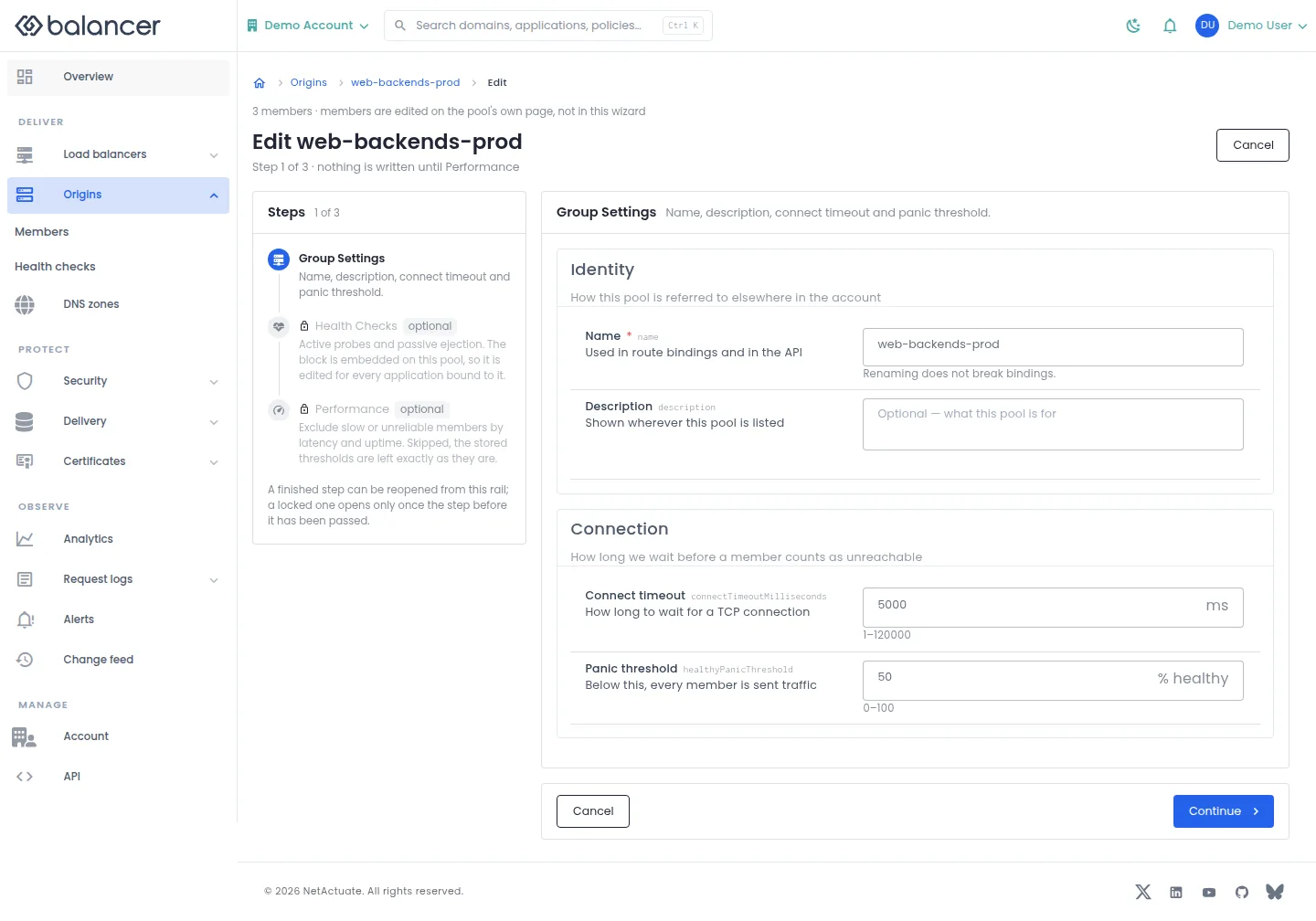
Configure pool identity, connection behavior, health checks and performance thresholds. Members are added from the pool page.
- Select New upstream group or Edit group. Enter Name and optional Description, Connect timeout and Panic threshold.
- Select Continue to review Health Checks and Performance. These steps are optional; review the final action before saving.
- Select Create Upstream Group when creating or Save Changes when editing. Reopen the pool to verify the saved settings. When editing, skipped performance settings retain their stored values.
| Field | Required | Description | Matching API field |
|---|---|---|---|
| Name | Yes | Used in route bindings and in the API. Renaming does not break bindings. | name |
| Description | No | Shown wherever this pool is listed | description |
| Connect timeout | No | How long to wait for a TCP connection. 1-120000 API default: 5000 ms. | connectTimeoutMilliseconds |
| Panic threshold | No | Below this, every member is sent traffic. 0-100 API default: 50%. | healthyPanicThreshold |
| Active probing | No | Probe each member from every location | healthCheck.active.enabled |
| Type | No | How each location probes the member | healthCheck.active.type |
| Path | No | Requested on every probe | healthCheck.active.path |
| Host header | No | Sent with the probe | healthCheck.active.domain |
| Probe port | No | Defaults to the member port | healthCheck.active.port |
| Method | No | GET reads the body; HEAD does not | healthCheck.active.httpMethod |
| Expected status | No | The response codes that count as passing | healthCheck.active.httpAllowedStatusCodes |
| Body must contain | No | Checked only when the status passes | healthCheck.active.matchHttpString |
| Interval | No | Between probes, from each location | healthCheck.active.intervalSeconds |
| Timeout | No | A probe that takes longer has failed | healthCheck.active.timeoutMilliseconds |
| Failures to eject | No | In a row, at one location | healthCheck.active.minimumConsecutiveFailures |
| Successes to restore | No | In a row, at one location | healthCheck.active.minimumConsecutiveSuccesses |
| Tries per check | No | Retries inside a single probe | healthCheck.active.triesPerCheck |
| Retry delay | No | Between tries inside one probe | healthCheck.active.retryDelaySeconds |
| Follow redirects | No | 0 means a redirect is a failure | healthCheck.active.maxRedirects |
| Probe over TLS | No | The probe itself, not traffic to the member | healthCheck.active.enableSsl |
| Accept an untrusted certificate | No | On the probe connection only | healthCheck.active.allowInsecureHttps |
| Client certificate | No | Presented by the probe | healthCheck.active.mtlsClientCertificateId |
| Agreement between locations | No | How many locations must agree a member is dead | healthCheck.active.localityRequirement |
| Answer must contain the member IP | No | DNS probes only | healthCheck.active.dnsRequireUpstreamIp |
| Eject on live traffic errors | No | On real requests, between active probes | healthCheck.passive.enabled |
| Consecutive 5xx | No | Before the member is ejected | healthCheck.passive.maxFails |
| Ejection time | No | Restored by the next passing probe | healthCheck.passive.failDuration |
| Failure window | No | The window the failures are counted in | healthCheck.passive.maxFailDurationMs |
| Statuses that count | No | Blank means every 5xx | healthCheck.passive.statuses |
| Exclusion on | No | Makes a member ineligible, not unhealthy | performanceThresholds.enabled |
| Must satisfy | No | Which thresholds a member has to meet | performanceThresholds.upstreamFiltering |
| Exclude missing reports | No | Left out of the window, not read as zero | performanceThresholds.excludeMissingReports |
| Probe window | No | Set the displayed option.. 1-10080 | performanceThresholds.probeWindowMinutes |
| Keep fastest | No | Set the displayed option.. 1-100 | performanceThresholds.minimumResponseTimePercent |
| Slowest allowed | No | Set the displayed option.. 1-300000 | performanceThresholds.maximumResponseTimeMs |
| Minimum uptime | No | Set the displayed option.. 1-100 | performanceThresholds.minimumUptimePercent |
API equivalent
Update the pool connection timeout. Use the API host shown in the Balancer portal in place of https://<your-api-host>. Set $BALANCER_API_KEY to your credential for this context. Set $UPSTREAM_GROUP_ID to the selected resources.
curl --fail-with-body --silent --show-error --request PATCH \
  --url "https://<your-api-host>/upstream-groups/$UPSTREAM_GROUP_ID" \
  --header "x-api-key: $BALANCER_API_KEY" \
  --header "Content-Type: application/json" \
  --data '{"connectTimeoutMilliseconds":5000}'
Expect HTTP 200 with code set to 200. The response acknowledges the stored change. Reopen the portal screen or run the read example below to verify it.
API reference: Update an upstream group configuration.
Verify with the API
Use the API host shown in the Balancer portal in place of https://<your-api-host>. Set $BALANCER_API_KEY to your credential for this context. Set $UPSTREAM_GROUP_ID to the resource identifiers you want to inspect.
curl --fail-with-body --silent --show-error --request GET \
  --url "https://<your-api-host>/upstream-groups/$UPSTREAM_GROUP_ID" \
  --header "x-api-key: $BALANCER_API_KEY"
Expect HTTP 200 with code set to 200. The response includes data.upstreamGroupId, data.name, data.description, data.connectTimeoutMilliseconds. Compare the returned configuration with the screen. A successful configuration read does not verify that an edge has applied it.
API reference: Get an upstream group.
Upstream details
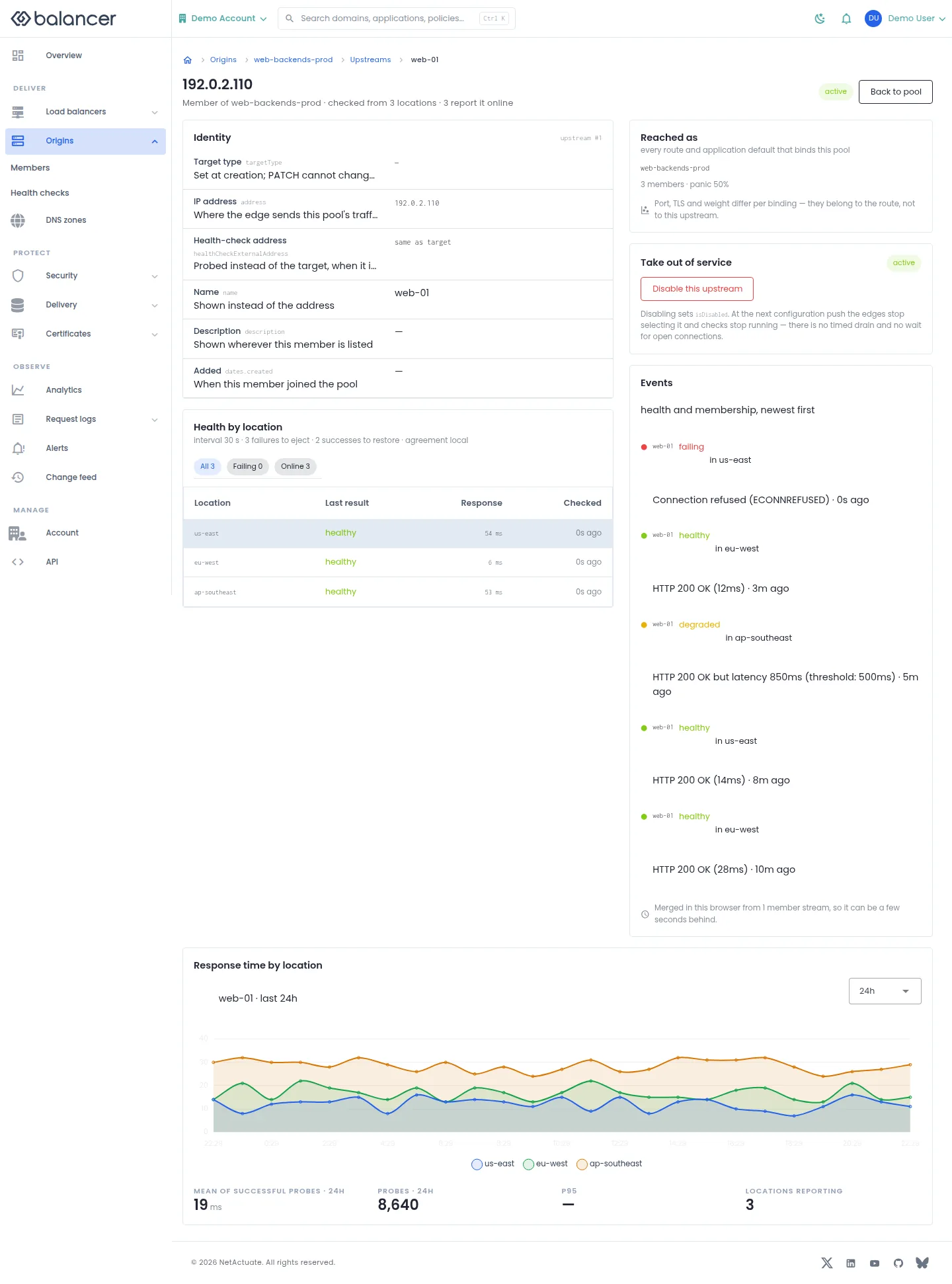
Inspect one origin member and its health by location.
- Open the pool and select a member. Review Health by location and Events.
- Select Disable this upstream to take it out of selection. Verify the disabled state after the next configuration update. There is no timed drain or wait for open connections.
- Select Back to pool to review the other members.
Verify with the API
Use the API host shown in the Balancer portal in place of https://<your-api-host>. Set $BALANCER_API_KEY to your credential for this context. Set $UPSTREAM_GROUP_ID, $UPSTREAM_ID to the resource identifiers you want to inspect.
curl --fail-with-body --silent --show-error --request GET \
  --url "https://<your-api-host>/upstream-groups/$UPSTREAM_GROUP_ID/upstreams/$UPSTREAM_ID" \
  --header "x-api-key: $BALANCER_API_KEY"
Expect HTTP 200 with code set to 200. The response includes data.upstreamId, data.name, data.description, data.targetType. Compare the returned configuration with the screen. A successful configuration read does not verify that an edge has applied it.
API reference: Get details of a single upstream.
All upstreams
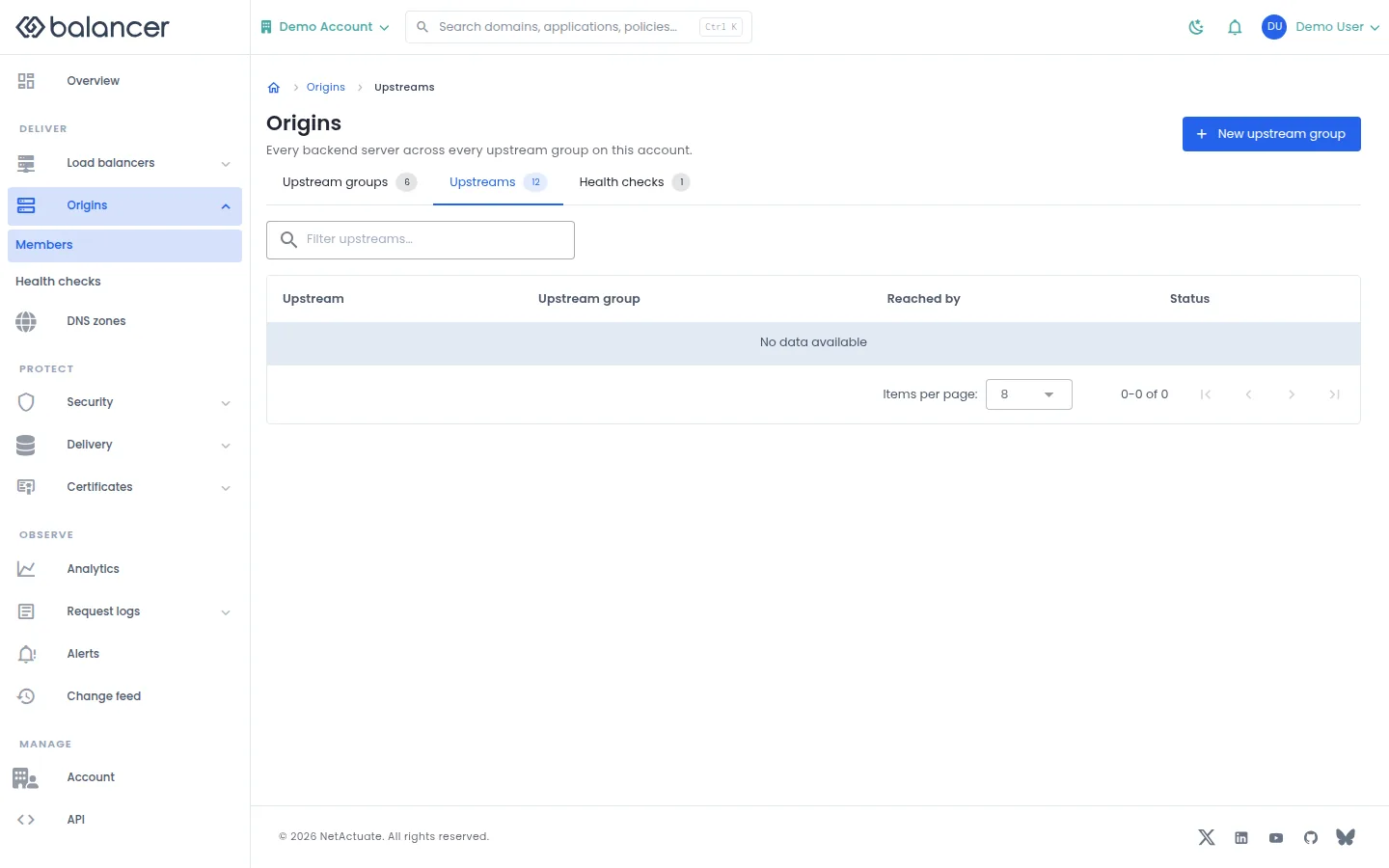
Inspect origin members across the account.
- Open Origins, then Upstreams.
- Review Upstream, Upstream group, Reached by and Status. Open a pool to manage its members.
Verify with the API
Use the API host shown in the Balancer portal in place of https://<your-api-host>. Set $BALANCER_API_KEY to your credential for this context.
curl --fail-with-body --silent --show-error --request GET \
  --url "https://<your-api-host>/upstream-groups" \
  --header "x-api-key: $BALANCER_API_KEY"
Expect HTTP 200 with code set to 200. The response includes data.meta.total, data.meta.offset, data.meta.limit, data.meta.suggestedFilters. Compare the returned configuration with the screen. A successful configuration read does not verify that an edge has applied it.
API reference: List upstream groups associated with your account.
Health checks
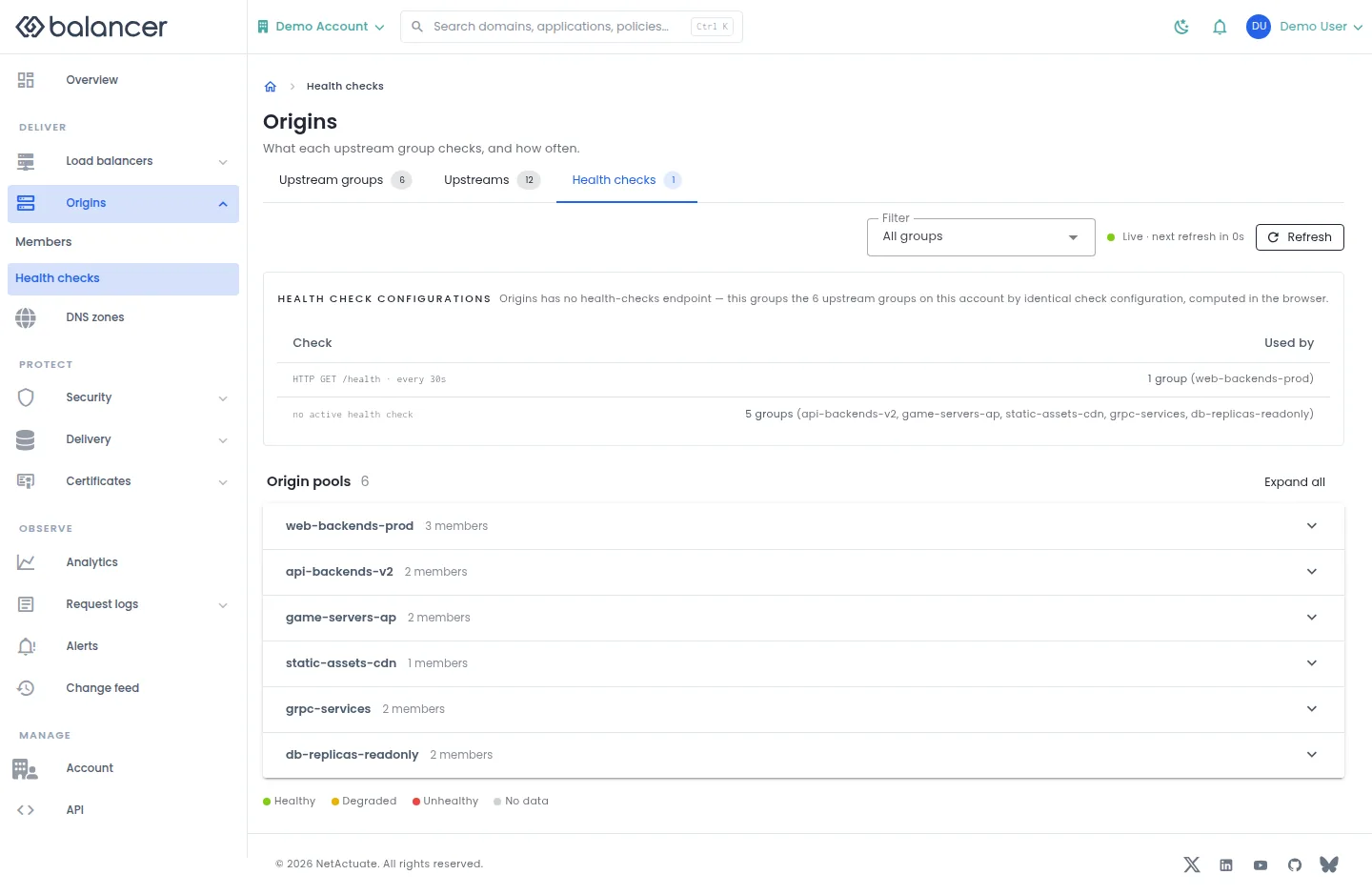
Review checks across upstream groups and open the pool that owns a check.
- Under Origins, select Health checks.
- Use Filter, then select Expand all to inspect the checks.
- Select Refresh and open an upstream group to change its embedded health check.
Verify with the API
Use the API host shown in the Balancer portal in place of https://<your-api-host>. Set $BALANCER_API_KEY to your credential for this context.
curl --fail-with-body --silent --show-error --request GET \
  --url "https://<your-api-host>/upstream-groups" \
  --header "x-api-key: $BALANCER_API_KEY"
Expect HTTP 200 with code set to 200. The response includes data.meta.total, data.meta.offset, data.meta.limit, data.meta.suggestedFilters. Compare the returned configuration with the screen. A successful configuration read does not verify that an edge has applied it.
API reference: List upstream groups associated with your account.
Related
- Task guide: origins health checks.
- Concepts: upstreams.
- Delete an upstream group.
- Remove a backend server from an upstream group.
- List upstream groups associated with your account.
- Get an upstream group.
- Get details of a single upstream.
- Update an upstream group configuration.
- Update an upstream's name, health check address, or disabled state.
- Creates a new upstream group (backend pool).