Applications and routes
Use applications and routes to bind hostnames to origins and set request matching, cache, TLS and security behavior.
Note: Balancer is in beta. Endpoints, fields and behavior may change before general availability, and the feature must be enabled on your account before use. Contact your NetActuate account manager to request access.
Before you begin
Choose the account that owns the resources. Create an HTTP load balancer before adding applications, and create an application before adding routes or domains.
Application groups
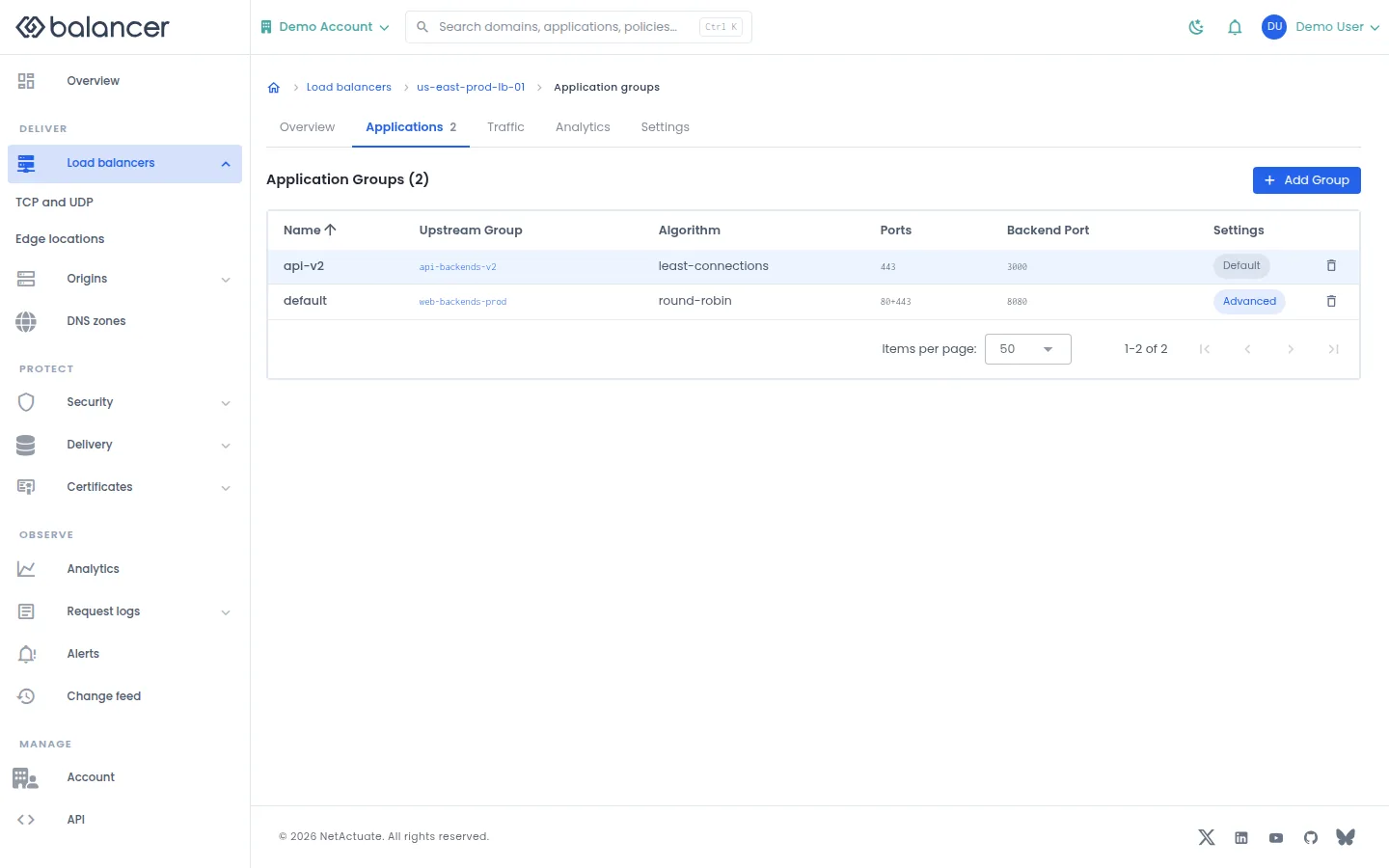
List the applications on an HTTP load balancer.
- Open the load balancer application list.
- Select Add Group to create an application group, or open an existing group. Verify its upstream group and algorithm.
Verify with the API
Use the API host shown in the Balancer portal in place of https://<your-api-host>. Set $BALANCER_API_KEY to your credential for this context. Set $HTTP_LB_ID to the resource identifiers you want to inspect.
curl --fail-with-body --silent --show-error --request GET \
  --url "https://<your-api-host>/http-loadbalancers/$HTTP_LB_ID/groups" \
  --header "x-api-key: $BALANCER_API_KEY"
Expect HTTP 200 with code set to 200. The response includes data.meta, data.data[], data.meta.total, data.meta.offset. Compare the returned configuration with the screen. A successful configuration read does not verify that an edge has applied it.
API reference: List HTTP groups.
Application overview
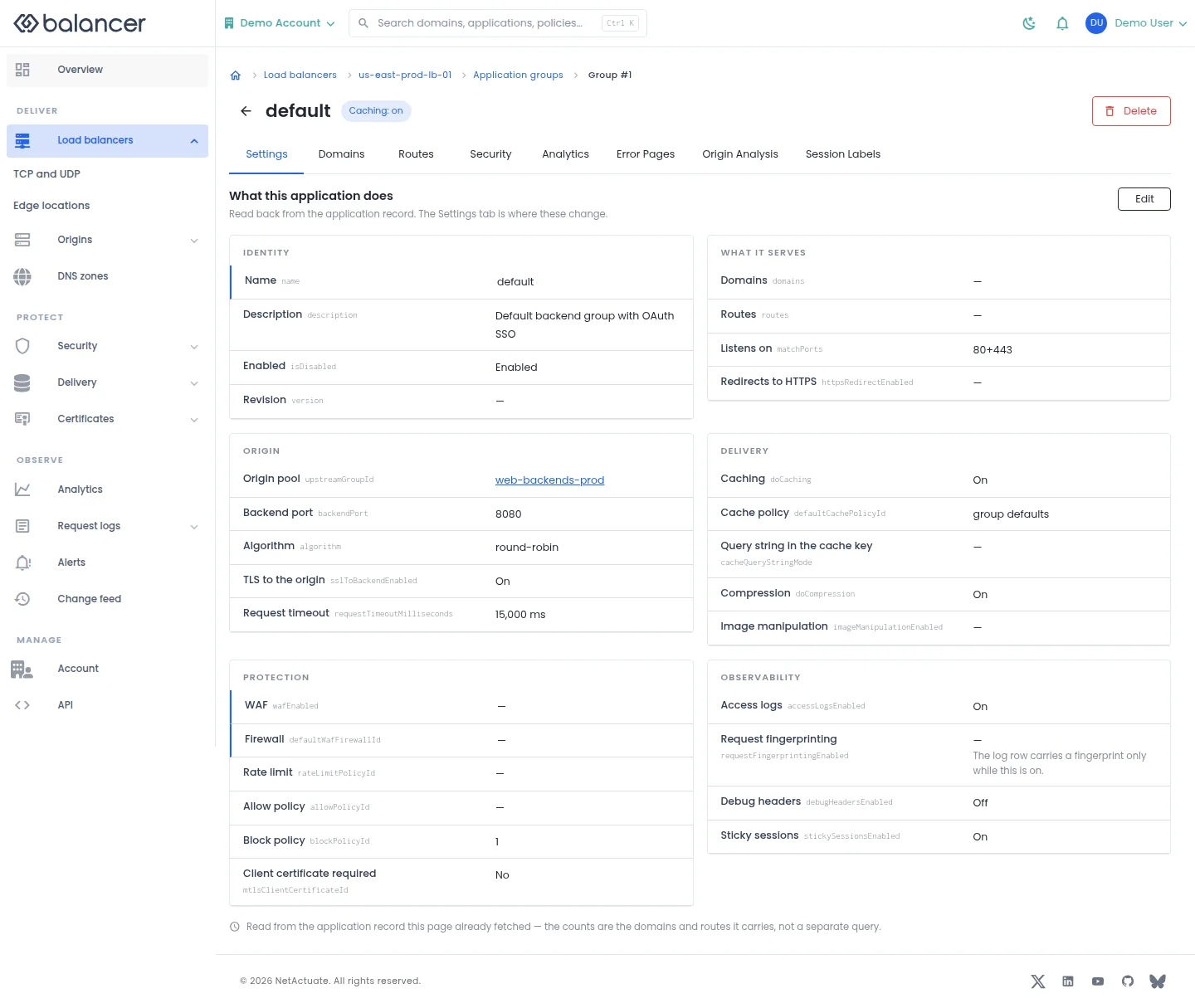
Review what an application does and navigate to its domains, routes and policy settings.
- Open an application from its load balancer.
- Review What this application does. Select Edit or Settings to change configuration.
- Use Domains, Routes, Security, Analytics or Error Pages for the matching task.
Verify with the API
Use the API host shown in the Balancer portal in place of https://<your-api-host>. Set $BALANCER_API_KEY to your credential for this context. Set $HTTP_LB_ID, $GROUP_ID to the resource identifiers you want to inspect.
curl --fail-with-body --silent --show-error --request GET \
  --url "https://<your-api-host>/http-loadbalancers/$HTTP_LB_ID/groups/$GROUP_ID" \
  --header "x-api-key: $BALANCER_API_KEY"
Expect HTTP 200 with code set to 200. The response includes data.name, data.description, data.version, data.backendPort. Compare the returned configuration with the screen. A successful configuration read does not verify that an edge has applied it.
API reference: Get HTTP group.
Application and route analytics
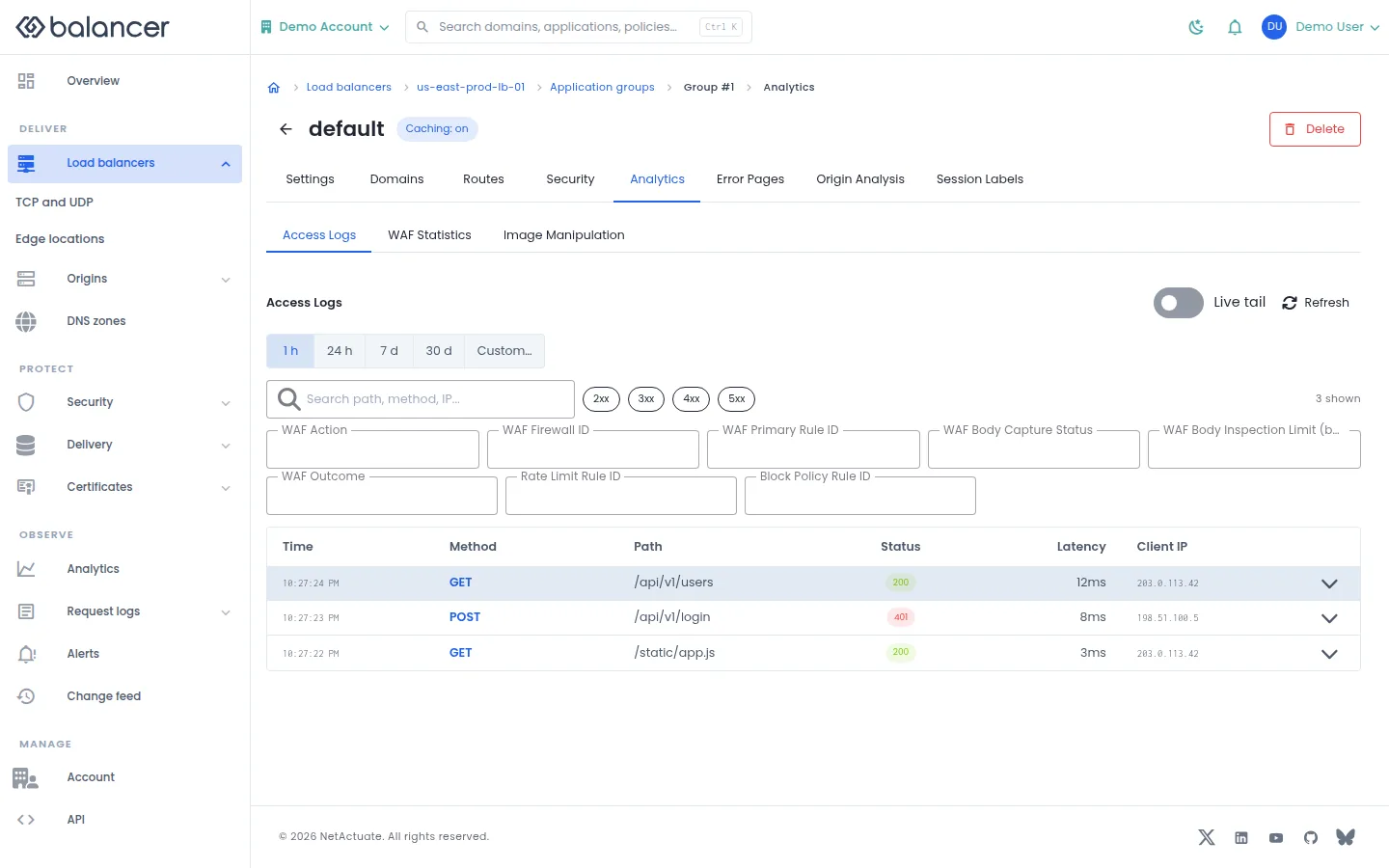
Inspect access logs, WAF statistics and image manipulation statistics at the selected scope.
- Open the application or route and select Analytics.
- Choose Access Logs, WAF Statistics or Image Manipulation, then set the time range.
- For logs, use Live tail or Refresh. Check that the selected application or route matches your investigation.
API equivalent
Query up to 100 access log records for the last 60 minutes. Charts based on sampled records are not a complete traffic count. Use the API host shown in the Balancer portal in place of https://<your-api-host>. Set $BALANCER_API_KEY to your credential for this context. Set $HTTP_LB_ID, $GROUP_ID to the selected resources.
curl --fail-with-body --silent --show-error --request POST \
  --url "https://<your-api-host>/http-loadbalancers/$HTTP_LB_ID/groups/$GROUP_ID/access-logs/query" \
  --header "x-api-key: $BALANCER_API_KEY" \
  --header "Content-Type: application/json" \
  --data '{"timeRange":{"pastMinutes":60},"limit":100}'
Expect HTTP 200 with code set to 200. Review the returned records and selected time range; an empty result does not establish that no traffic occurred.
API reference: Query managed access logs for an HTTP group.
Verify with the API
Use the API host shown in the Balancer portal in place of https://<your-api-host>. Set $BALANCER_API_KEY to your credential for this context. Set $HTTP_LB_ID, $GROUP_ID to the resource identifiers you want to inspect.
curl --fail-with-body --silent --show-error --request GET \
  --url "https://<your-api-host>/http-loadbalancers/$HTTP_LB_ID/groups/$GROUP_ID" \
  --header "x-api-key: $BALANCER_API_KEY"
Expect HTTP 200 with code set to 200. The response includes data.name, data.description, data.version, data.backendPort. Compare the returned configuration with the screen. A successful configuration read does not verify that an edge has applied it.
API reference: Get HTTP group.
Application domains
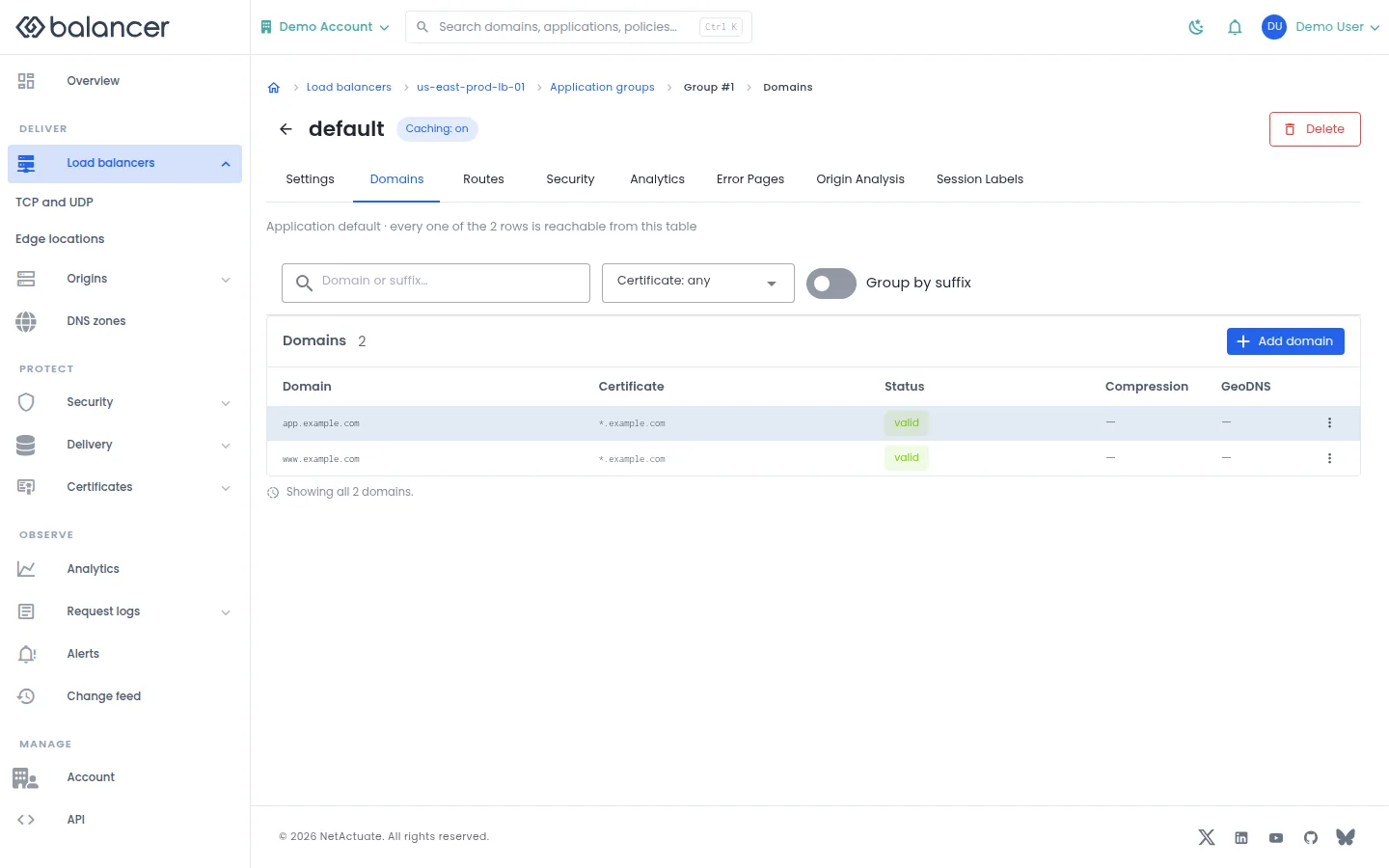
Manage hostnames served by an application and their certificate settings.
- Open the application and select Domains. Select Add domain.
- Enter Domain, choose certificate settings and submit.
- Verify the hostname in Domain, then review Certificate and Status. Use Group by suffix to organize the list.
| Field | Required | Description | Matching API field |
|---|---|---|---|
| **Domain *** | Yes | Domain or wildcard hostname. | domain |
| Let's Encrypt | No | Request managed issuance. | doLetsEncrypt |
| SSL Certificate | No | Existing certificate for the domain. | sslCertificateId |
Verify with the API
Use the API host shown in the Balancer portal in place of https://<your-api-host>. Set $BALANCER_API_KEY to your credential for this context. Set $HTTP_LB_ID, $GROUP_ID to the resource identifiers you want to inspect.
curl --fail-with-body --silent --show-error --request GET \
  --url "https://<your-api-host>/http-loadbalancers/$HTTP_LB_ID/groups/$GROUP_ID/domains" \
  --header "x-api-key: $BALANCER_API_KEY"
Expect HTTP 200 with code set to 200. The response includes data.meta, data.data[], data.meta.total, data.meta.offset. Compare the returned configuration with the screen. A successful configuration read does not verify that an edge has applied it.
API reference: List domains for an HTTP group.
Error page bindings
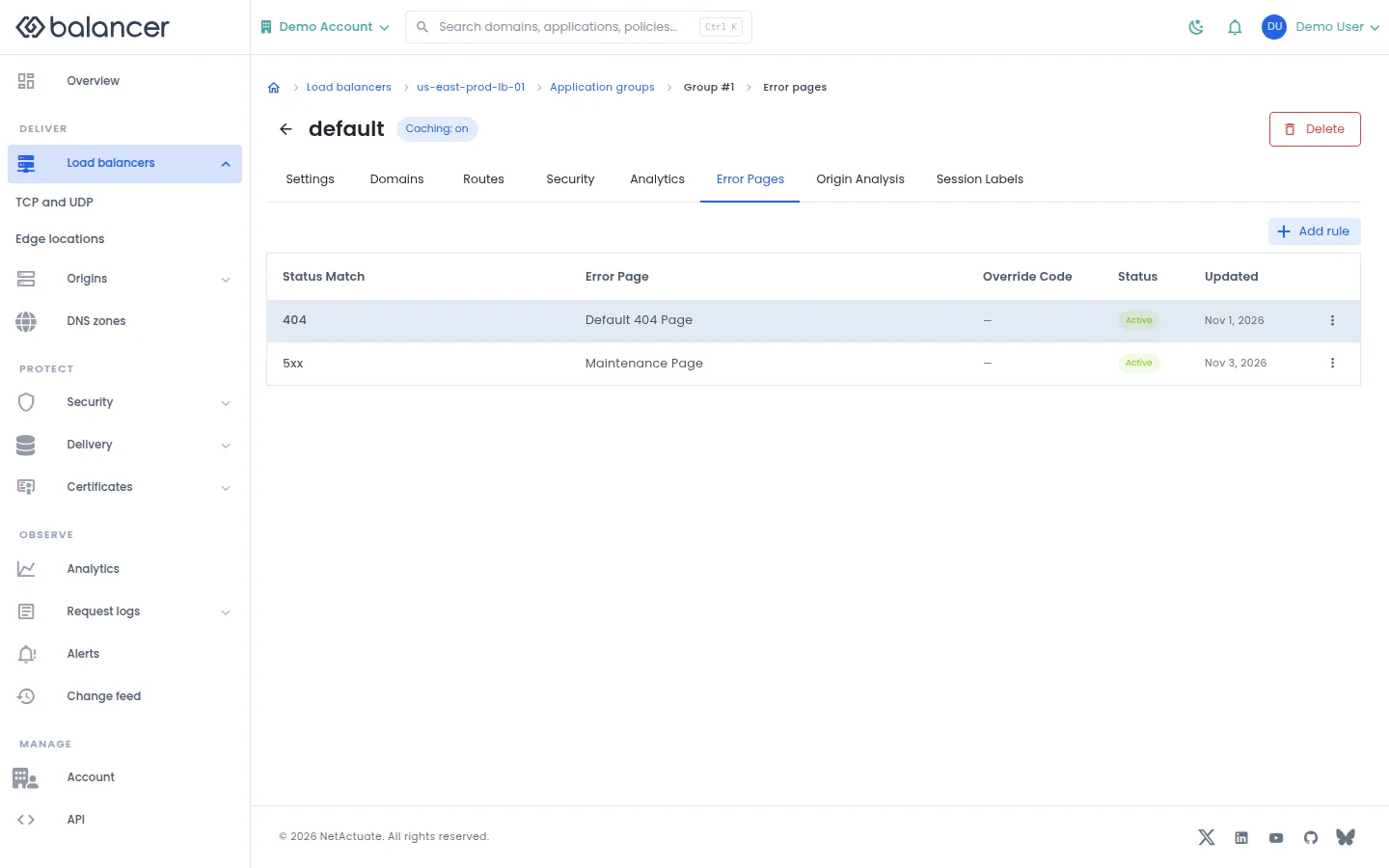
Match response status codes to a reusable error document at application or route scope.
- Open the application or route and select Error Pages. Select Add rule.
- Set Status Match, Error Page and optionally Override Code. Submit the rule.
- Verify the entry and its Status. Review the reusable document under Delivery, Error pages.
| Field | Required | Description | Matching API field |
|---|---|---|---|
| Status Match | Yes | Non-empty status match. Validation: Status match is required. | statusMatch |
| Error Page | Yes | Existing error page asset. | errorPageAssetId |
| Override Code | No | Whole status code, 400-599. | responseStatusCode |
| Status | No | Enable or disable the rule. | isDisabled |
Verify with the API
Use the API host shown in the Balancer portal in place of https://<your-api-host>. Set $BALANCER_API_KEY to your credential for this context. Set $HTTP_LB_ID, $GROUP_ID to the resource identifiers you want to inspect.
curl --fail-with-body --silent --show-error --request GET \
  --url "https://<your-api-host>/http-loadbalancers/$HTTP_LB_ID/groups/$GROUP_ID/error-page-rules" \
  --header "x-api-key: $BALANCER_API_KEY"
Expect HTTP 200 with code set to 200. The response includes data.meta, data.data[], data.meta.total, data.meta.offset. Compare the returned configuration with the screen. A successful configuration read does not verify that an edge has applied it.
API reference: List custom error page rules for an HTTP group.
Origin Analysis
No screenshot is available for this screen.
Add request expressions that seed origin analysis signals without blocking or rewriting requests.
- Open an application and select Origin Analysis. If loading fails, select Retry.
- Select Add rule, enter When a request matches and choose State. Select Add rule to save.
- Verify the expression and active state in the rule list. Use Edit or Delete from row actions to maintain it.
| Field | Required | Description | Matching API field |
|---|---|---|---|
| When a request matches | Yes | 1-8192 characters. Validation: Expression is required. | requestExpression |
| State | No | Active unless disabled. | isDisabled |
Verify with the API
Use the API host shown in the Balancer portal in place of https://<your-api-host>. Set $BALANCER_API_KEY to your credential for this context. Set $HTTP_LB_ID, $GROUP_ID to the resource identifiers you want to inspect.
curl --fail-with-body --silent --show-error --request GET \
  --url "https://<your-api-host>/http-loadbalancers/$HTTP_LB_ID/groups/$GROUP_ID/origin-analysis-rules" \
  --header "x-api-key: $BALANCER_API_KEY"
Expect HTTP 200 with code set to 200. The response includes data.meta, data.data[], data.meta.total, data.meta.offset. Compare the returned configuration with the screen. A successful configuration read does not verify that an edge has applied it.
API reference: List origin analysis rules for an HTTP group.
Route overview
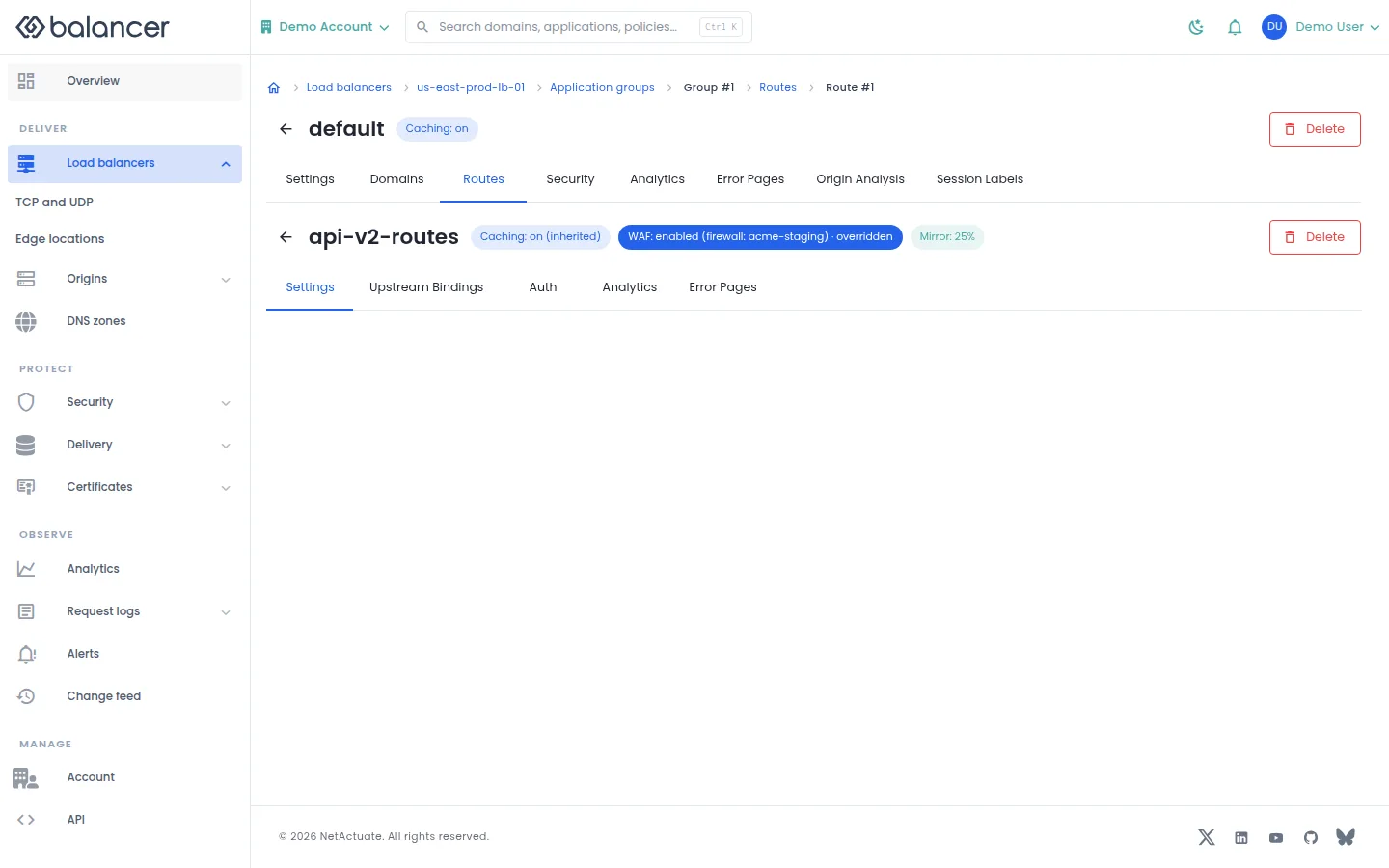
Review a route within its parent application and navigate to its overrides.
- Open an application, select Routes and open a route.
- Use Settings, Upstream Bindings, Auth, Analytics or Error Pages to inspect the corresponding configuration.
Verify with the API
Use the API host shown in the Balancer portal in place of https://<your-api-host>. Set $BALANCER_API_KEY to your credential for this context. Set $HTTP_LB_ID, $GROUP_ID, $ROUTE_ID to the resource identifiers you want to inspect.
curl --fail-with-body --silent --show-error --request GET \
  --url "https://<your-api-host>/http-loadbalancers/$HTTP_LB_ID/groups/$GROUP_ID/routes/$ROUTE_ID" \
  --header "x-api-key: $BALANCER_API_KEY"
Expect HTTP 200 with code set to 200. The response includes data.name, data.description, data.version, data.priority. Compare the returned configuration with the screen. A successful configuration read does not verify that an edge has applied it.
API reference: Get HTTP group route.
Application and route analytics (alternate view 2)
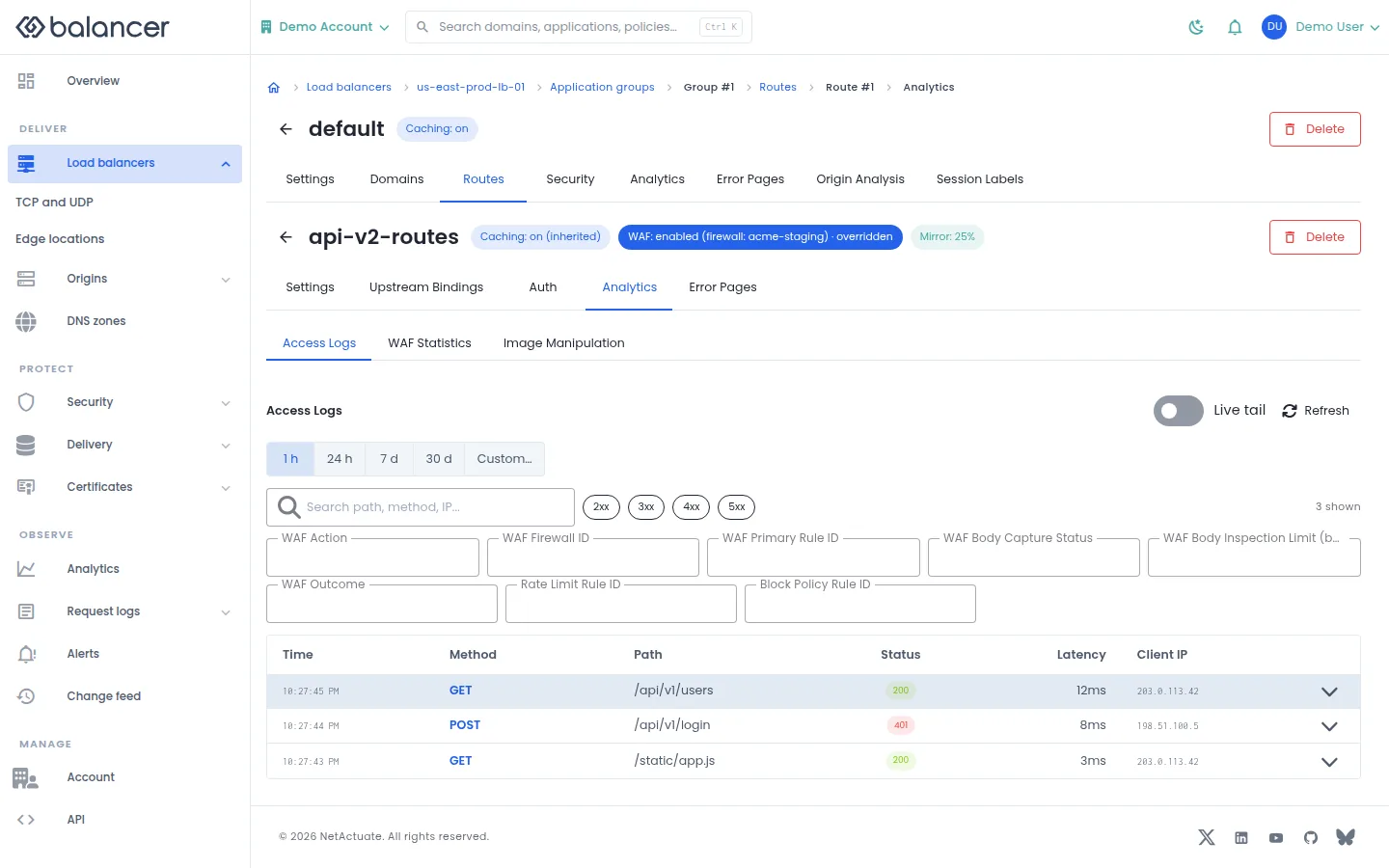
Inspect access logs, WAF statistics and image manipulation statistics at the selected scope.
- Open the application or route and select Analytics.
- Choose Access Logs, WAF Statistics or Image Manipulation, then set the time range.
- For logs, use Live tail or Refresh. Check that the selected application or route matches your investigation.
API equivalent
Query up to 100 access log records for the last 60 minutes. Charts based on sampled records are not a complete traffic count. Use the API host shown in the Balancer portal in place of https://<your-api-host>. Set $BALANCER_API_KEY to your credential for this context. Set $HTTP_LB_ID, $GROUP_ID, $ROUTE_ID to the selected resources.
curl --fail-with-body --silent --show-error --request POST \
  --url "https://<your-api-host>/http-loadbalancers/$HTTP_LB_ID/groups/$GROUP_ID/routes/$ROUTE_ID/access-logs/query" \
  --header "x-api-key: $BALANCER_API_KEY" \
  --header "Content-Type: application/json" \
  --data '{"timeRange":{"pastMinutes":60},"limit":100}'
Expect HTTP 200 with code set to 200. Review the returned records and selected time range; an empty result does not establish that no traffic occurred.
API reference: Query managed access logs for an HTTP route.
Verify with the API
Use the API host shown in the Balancer portal in place of https://<your-api-host>. Set $BALANCER_API_KEY to your credential for this context. Set $HTTP_LB_ID, $GROUP_ID, $ROUTE_ID to the resource identifiers you want to inspect.
curl --fail-with-body --silent --show-error --request GET \
  --url "https://<your-api-host>/http-loadbalancers/$HTTP_LB_ID/groups/$GROUP_ID/routes/$ROUTE_ID" \
  --header "x-api-key: $BALANCER_API_KEY"
Expect HTTP 200 with code set to 200. The response includes data.name, data.description, data.version, data.priority. Compare the returned configuration with the screen. A successful configuration read does not verify that an edge has applied it.
API reference: Get HTTP group route.
Route authentication
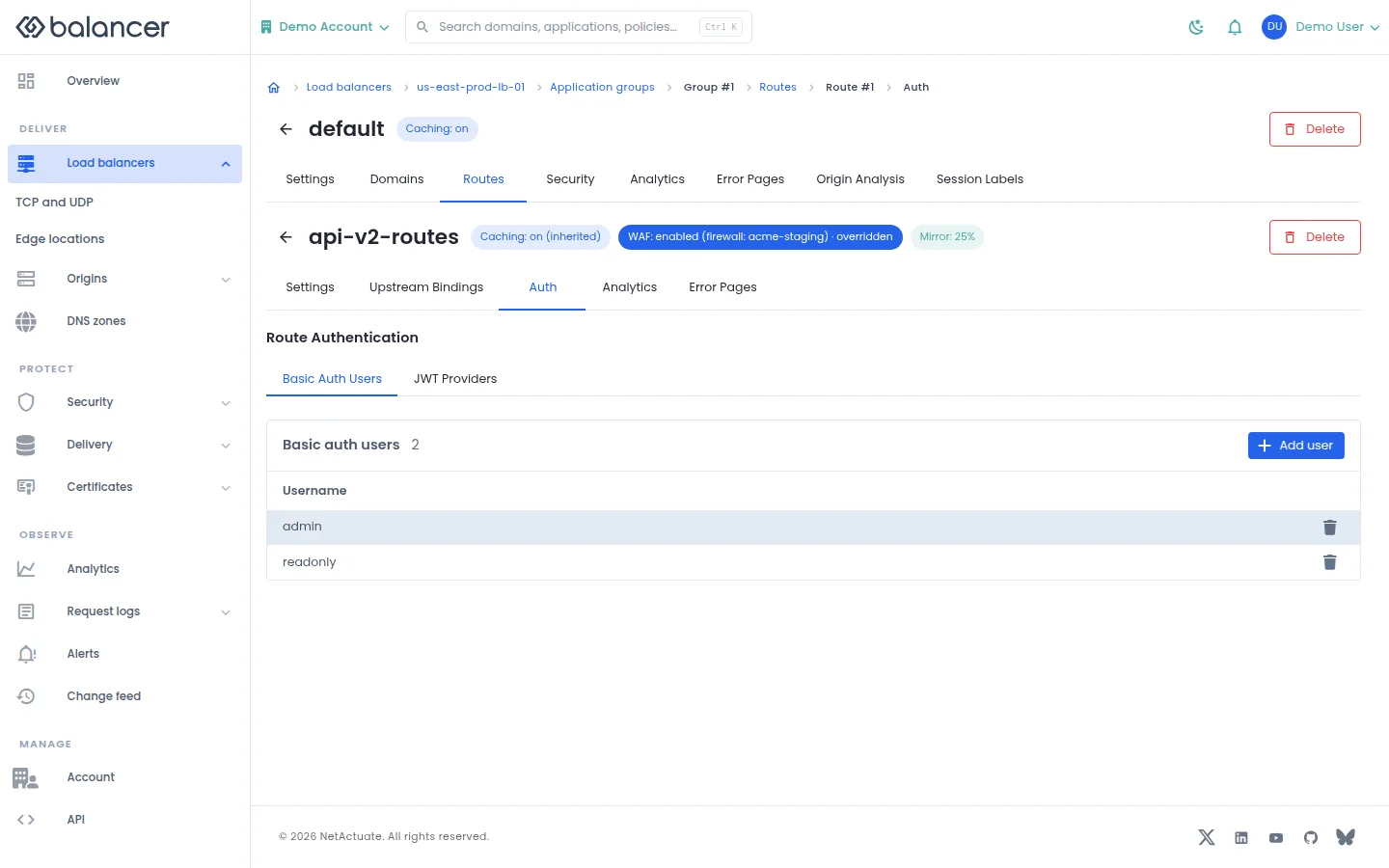
Manage basic authentication users and JWT providers for a route.
- Open a route and select Auth.
- Select Basic Auth Users, then Add user. Enter the username and password and submit. Verify the username in the list.
- Select JWT Providers to review provider configuration separately.
| Field | Required | Description | Matching API field |
|---|---|---|---|
| Username | Yes | 1-64 characters. Validation: Username is required. | username |
| Password | Yes, when creating a user | Password for this user. | password |
| Name | Yes, for a JWT provider | 1-64 characters. | name |
| Issuer | Yes, for a JWT provider | 1-255 characters. Validation: Issuer is required. | issuer |
| Description | No | Up to 255 characters. | description |
| JWKS source | No | Choose URI or inline content; this selects which API field is sent. | jwksUri / jwks |
| JWKS URI | For URI source | Up to 512 characters. | jwksUri |
| Inline JWKS | For inline source | Up to 32768 characters. | jwks |
| Audiences | No | Accepted audience values. | audiences |
| From headers | No | Headers to read for authentication. | fromHeaders |
| From query params | No | Query parameters to read for authentication. | fromParams |
| Forward the token | No | Forward the original credential. | forward |
| Payload header | No | Up to 64 characters. | forwardPayloadHeader |
Verify with the API
Use the API host shown in the Balancer portal in place of https://<your-api-host>. Set $BALANCER_API_KEY to your credential for this context. Set $HTTP_LB_ID, $GROUP_ID, $ROUTE_ID to the resource identifiers you want to inspect.
curl --fail-with-body --silent --show-error --request GET \
  --url "https://<your-api-host>/http-loadbalancers/$HTTP_LB_ID/groups/$GROUP_ID/routes/$ROUTE_ID/basic-auth-users" \
  --header "x-api-key: $BALANCER_API_KEY"
Expect HTTP 200 with code set to 200. The response includes data.meta, data.data[], data.meta.total, data.meta.offset. Compare the returned configuration with the screen. A successful configuration read does not verify that an edge has applied it.
API reference: List basic auth users for a route.
Error page bindings (alternate view 2)
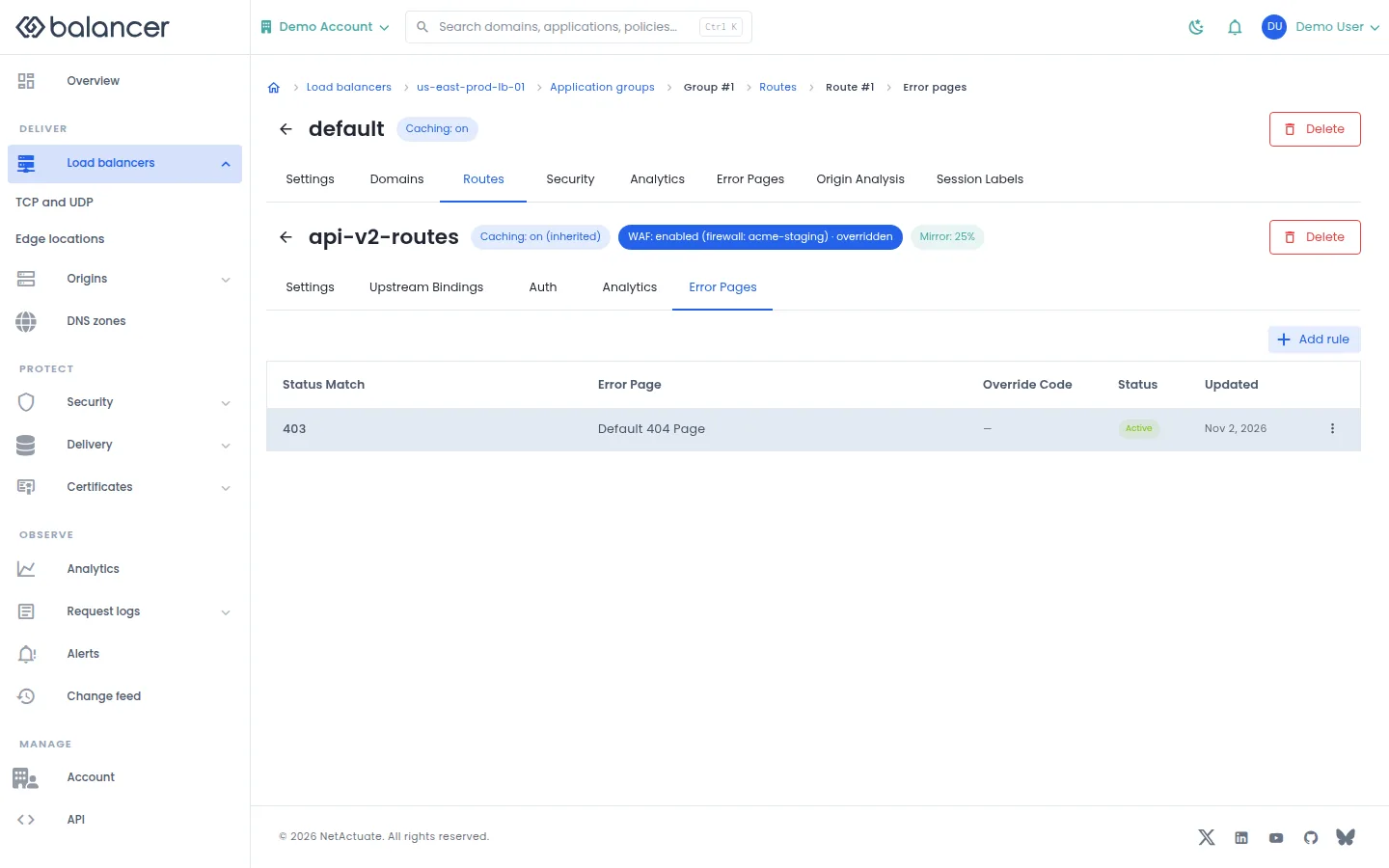
Match response status codes to a reusable error document at application or route scope.
- Open the application or route and select Error Pages. Select Add rule.
- Set Status Match, Error Page and optionally Override Code. Submit the rule.
- Verify the entry and its Status. Review the reusable document under Delivery, Error pages.
| Field | Required | Description | Matching API field |
|---|---|---|---|
| Status Match | Yes | Non-empty status match. Validation: Status match is required. | statusMatch |
| Error Page | Yes | Existing error page asset. | errorPageAssetId |
| Override Code | No | Whole status code, 400-599. | responseStatusCode |
| Status | No | Enable or disable the rule. | isDisabled |
Verify with the API
Use the API host shown in the Balancer portal in place of https://<your-api-host>. Set $BALANCER_API_KEY to your credential for this context. Set $HTTP_LB_ID, $GROUP_ID, $ROUTE_ID to the resource identifiers you want to inspect.
curl --fail-with-body --silent --show-error --request GET \
  --url "https://<your-api-host>/http-loadbalancers/$HTTP_LB_ID/groups/$GROUP_ID/routes/$ROUTE_ID/error-page-rules" \
  --header "x-api-key: $BALANCER_API_KEY"
Expect HTTP 200 with code set to 200. The response includes data.meta, data.data[], data.meta.total, data.meta.offset. Compare the returned configuration with the screen. A successful configuration read does not verify that an edge has applied it.
API reference: List custom error page rules for an HTTP route.
Route settings
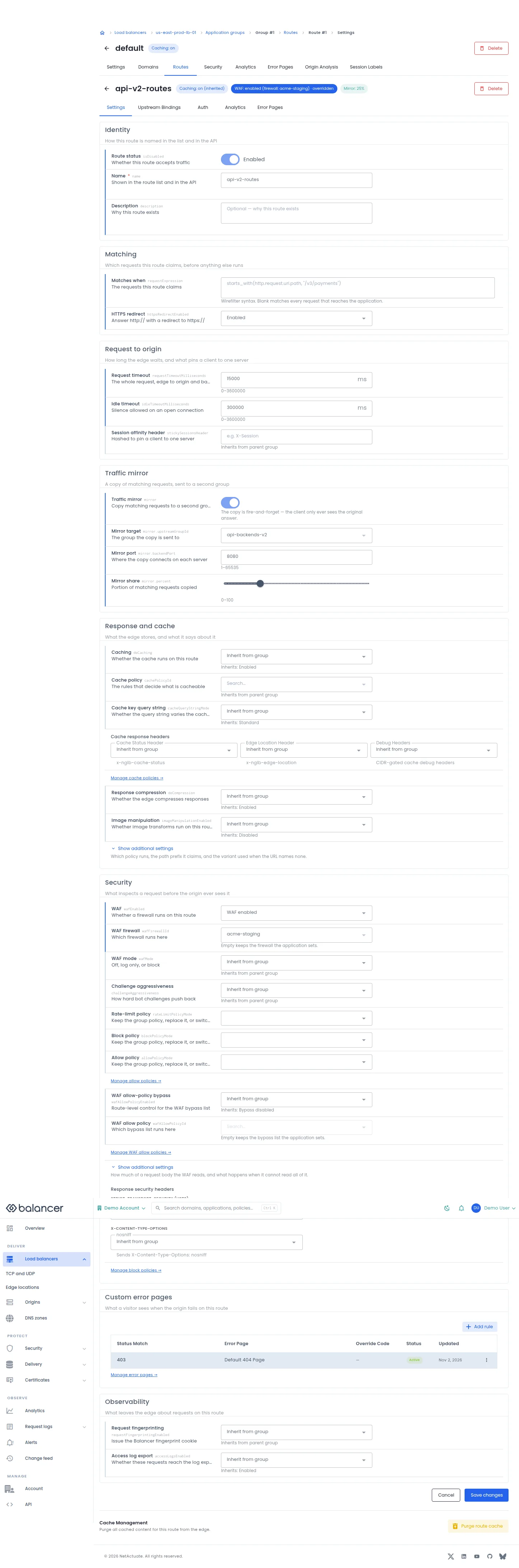
Set route identity, matching, origin behavior and overrides of application settings.
- Open the route and select Settings.
- Update Name, Matches when and any overrides. Use Show additional settings for extra controls.
- Select Save changes, reopen the route and verify the stored values.
- To remove cached responses for this route, select Purge route cache and review the result.
| Field | Required | Description | Matching API field |
|---|---|---|---|
| Status Match | Yes | Non-empty status match. Validation: Status match is required. | statusMatch |
| Error Page | Yes | Existing error page asset. | errorPageAssetId |
| Override Code | No | Whole status code, 400-599. | responseStatusCode |
| Status | No | Enable or disable the rule. | isDisabled |
| Route status | No | Whether this route accepts traffic | isDisabled |
| Name | Yes | Shown in the route list and in the API | name |
| Description | No | Why this route exists | description |
| Position | No | Where this route sits in the evaluation order | priority |
| Matches when | No | The requests this route claims | requestExpression |
| HTTPS redirect | No | Answer http:// with a redirect to https:// | httpsRedirectEnabled |
| Request timeout | No | The whole request, edge to origin and back. 0-3600000 | requestTimeoutMilliseconds |
| Idle timeout | No | Silence allowed on an open connection. 0-3600000 | idleTimeoutMilliseconds |
| Session affinity header | No | Hashed to pin a client to one server. Up to 128 characters. | stickySessionsHeader |
| Caching | No | Whether the cache runs on this route | doCaching |
| Cache policy | No | The rules that decide what is cacheable | cachePolicyId |
| Cache key query string | No | Whether the query string varies the cache key | cacheQueryStringMode |
| Response compression | No | Whether the edge compresses responses | doCompression |
| Image manipulation | No | Whether image transforms run on this route | imageManipulationEnabled |
| Image manipulation policy | No | The policy that defines the allowed transforms | imageManipulationPolicyId |
| Image path prefix | No | The path segment reserved for transforms. Up to 64 characters. | imageManipulationPrefix |
| Default variant | No | Used when the URL names no ops or variant. Up to 64 characters. | defaultImageManipulationVariant |
| WAF | No | Whether a firewall runs on this route | wafEnabled |
| WAF firewall | No | Which firewall runs here | wafFirewallId |
| WAF mode | No | Off, log only, or block | wafMode |
| Request fingerprinting | No | Issue the Balancer fingerprint cookie | requestFingerprintingEnabled |
| Body inspection limit | No | How much of a body the WAF reads. 1024-1048576 | wafBodyInspectionLimitBytes |
| Body capture timeout | No | How long the edge waits for that body. 50-5000 | wafBodyCaptureTimeoutMs |
| Incomplete body | No | When the body cannot be read in full | wafIncompleteBodyAction |
| Challenge aggressiveness | No | How hard bot challenges push back. 0-5. 0 turns challenges off, 5 is maximum. | challengeAggressiveness |
| Allow policy | No | Keep the group policy, replace it, or switch it off | allowPolicyMode |
| WAF allow-policy bypass | No | Route-level control for the WAF bypass list | wafAllowPolicyEnabled |
| WAF allow policy | No | Which bypass list runs here | wafAllowPolicyId |
| Rate-limit policy | No | Keep the group policy, replace it, or switch it off | rateLimitPolicyMode |
| Rate-limit policy ID | No | The policy this route uses instead | rateLimitPolicyId |
| Block policy | No | Keep the group policy, replace it, or switch it off | blockPolicyMode |
| Access log export | No | Whether these requests reach the log export | accessLogsEnabled |
| Traffic mirror | No | Copy matching requests to a second group | mirror |
| Mirror target | No | The group the copy is sent to | mirror.upstreamGroupId |
| Mirror port | No | Where the copy connects on each server. 1-65535 | mirror.backendPort |
| Mirror share | No | Portion of matching requests copied. 0-100 | mirror.percent |
| Upstream groups | No | Group, port and share of traffic | upstreamBindings |
| Cache Status Header | No | Include cache status response header. | cacheStatusHeaderEnabled |
| Edge Location Header | No | Include edge location response header. | cacheEdgeLocationHeaderEnabled |
| Debug Headers | No | Enable diagnostic headers subject to configured CIDRs. | debugHeadersEnabled |
| Max-Age (seconds) | When HSTS is enabled | 0-63072000 seconds. | securityHeaders.strictTransportSecurity.maxAgeSeconds |
| Include Sub-Domains | No | Apply HSTS to subdomains. | securityHeaders.strictTransportSecurity.includeSubDomains |
| Preload | No | Set the HSTS preload directive. | securityHeaders.strictTransportSecurity.preload |
| Add CIDR | When debug headers are enabled | Allowed source network for debug headers. | debugHeadersCidrs |
| HSTS | No | Enable the HSTS response header. | securityHeaders.strictTransportSecurity.enabled |
| nosniff | No | Enable the content type protection header. | securityHeaders.contentTypeOptions.nosniff |
Verify with the API
Use the API host shown in the Balancer portal in place of https://<your-api-host>. Set $BALANCER_API_KEY to your credential for this context. Set $HTTP_LB_ID, $GROUP_ID, $ROUTE_ID to the resource identifiers you want to inspect.
curl --fail-with-body --silent --show-error --request GET \
  --url "https://<your-api-host>/http-loadbalancers/$HTTP_LB_ID/groups/$GROUP_ID/routes/$ROUTE_ID" \
  --header "x-api-key: $BALANCER_API_KEY"
Expect HTTP 200 with code set to 200. The response includes data.name, data.description, data.version, data.priority. Compare the returned configuration with the screen. A successful configuration read does not verify that an edge has applied it.
API reference: Get HTTP group route.
Upstream Bindings
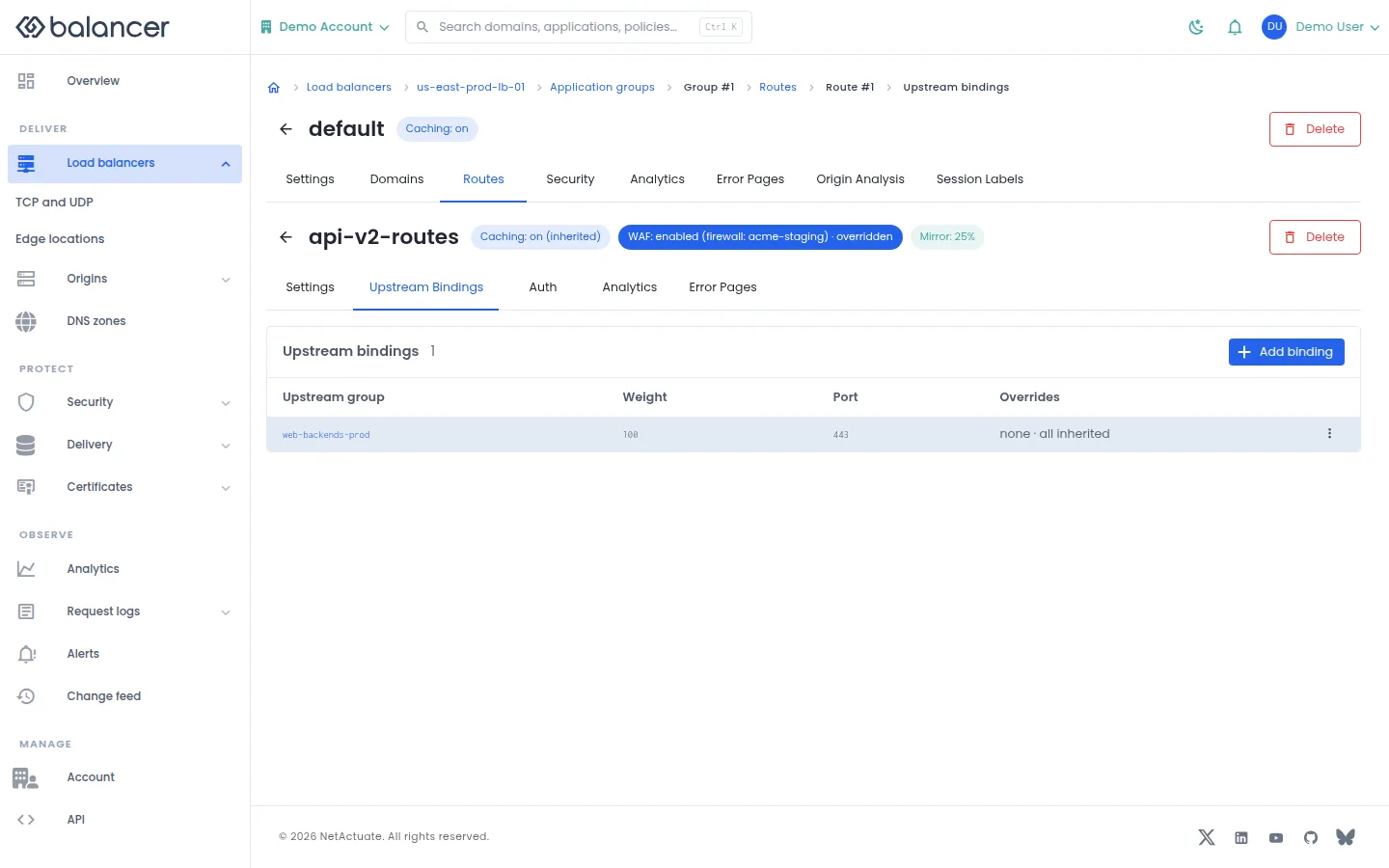
Bind a route to upstream groups with a port and traffic weight.
- Open a route and select Upstream Bindings, then Add binding.
- Choose Upstream group, Port and Weight, then submit.
- Verify the binding in the table. Port and weight belong to this binding rather than to the upstream member.
| Field | Required | Description | Matching API field |
|---|---|---|---|
| Upstream group | Yes | Pool receiving requests. | upstreamGroupId |
| Port | Yes | Origin port, 1-65535. | backendPort |
| Weight | No | Relative share assigned to this binding. | trafficWeight |
Verify with the API
Use the API host shown in the Balancer portal in place of https://<your-api-host>. Set $BALANCER_API_KEY to your credential for this context. Set $HTTP_LB_ID, $GROUP_ID, $ROUTE_ID to the resource identifiers you want to inspect.
curl --fail-with-body --silent --show-error --request GET \
  --url "https://<your-api-host>/http-loadbalancers/$HTTP_LB_ID/groups/$GROUP_ID/routes/$ROUTE_ID/upstream-bindings" \
  --header "x-api-key: $BALANCER_API_KEY"
Expect HTTP 200 with code set to 200. The response includes data.meta, data.data[], data.meta.total, data.meta.offset. Compare the returned configuration with the screen. A successful configuration read does not verify that an edge has applied it.
API reference: List upstream bindings for a route.
Create Route
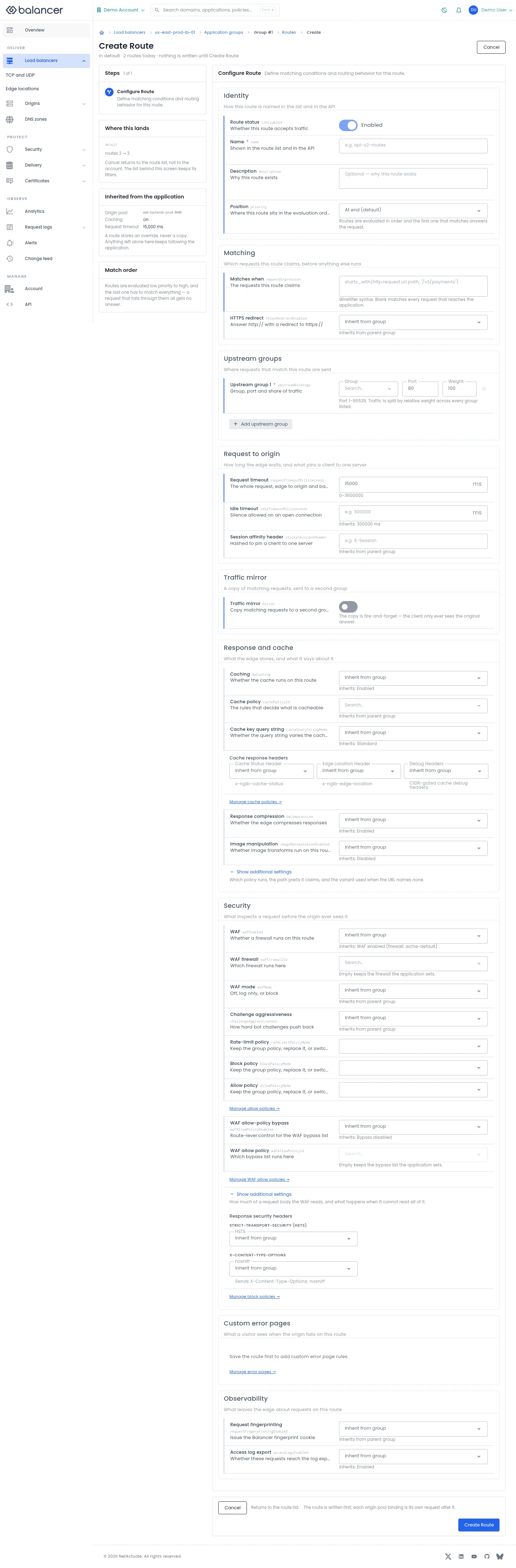
Create a route within an existing application.
- Open the application, then Routes, and choose the create action.
- Enter Name and Matches when. Select Add upstream group if the route needs explicit bindings, then set Group, Port and Weight.
- Review overrides and select Create Route. Verify the route under the application.
| Field | Required | Description | Matching API field |
|---|---|---|---|
| Upstream group | Yes | Pool receiving requests. | upstreamGroupId |
| Port | Yes | Origin port, 1-65535. | backendPort |
| Weight | No | Relative share assigned to this binding. | trafficWeight |
| Route status | No | Whether this route accepts traffic | isDisabled |
| Name | Yes | Shown in the route list and in the API | name |
| Description | No | Why this route exists | description |
| Position | No | Where this route sits in the evaluation order | priority |
| Matches when | No | The requests this route claims | requestExpression |
| HTTPS redirect | No | Answer http:// with a redirect to https:// | httpsRedirectEnabled |
| Request timeout | No | The whole request, edge to origin and back. 0-3600000 | requestTimeoutMilliseconds |
| Idle timeout | No | Silence allowed on an open connection. 0-3600000 | idleTimeoutMilliseconds |
| Session affinity header | No | Hashed to pin a client to one server. Up to 128 characters. | stickySessionsHeader |
| Caching | No | Whether the cache runs on this route | doCaching |
| Cache policy | No | The rules that decide what is cacheable | cachePolicyId |
| Cache key query string | No | Whether the query string varies the cache key | cacheQueryStringMode |
| Response compression | No | Whether the edge compresses responses | doCompression |
| Image manipulation | No | Whether image transforms run on this route | imageManipulationEnabled |
| Image manipulation policy | No | The policy that defines the allowed transforms | imageManipulationPolicyId |
| Image path prefix | No | The path segment reserved for transforms. Up to 64 characters. | imageManipulationPrefix |
| Default variant | No | Used when the URL names no ops or variant. Up to 64 characters. | defaultImageManipulationVariant |
| WAF | No | Whether a firewall runs on this route | wafEnabled |
| WAF firewall | No | Which firewall runs here | wafFirewallId |
| WAF mode | No | Off, log only, or block | wafMode |
| Request fingerprinting | No | Issue the Balancer fingerprint cookie | requestFingerprintingEnabled |
| Body inspection limit | No | How much of a body the WAF reads. 1024-1048576 | wafBodyInspectionLimitBytes |
| Body capture timeout | No | How long the edge waits for that body. 50-5000 | wafBodyCaptureTimeoutMs |
| Incomplete body | No | When the body cannot be read in full | wafIncompleteBodyAction |
| Challenge aggressiveness | No | How hard bot challenges push back. 0-5. 0 turns challenges off, 5 is maximum. | challengeAggressiveness |
| Allow policy | No | Keep the group policy, replace it, or switch it off | allowPolicyMode |
| WAF allow-policy bypass | No | Route-level control for the WAF bypass list | wafAllowPolicyEnabled |
| WAF allow policy | No | Which bypass list runs here | wafAllowPolicyId |
| Rate-limit policy | No | Keep the group policy, replace it, or switch it off | rateLimitPolicyMode |
| Rate-limit policy ID | No | The policy this route uses instead | rateLimitPolicyId |
| Block policy | No | Keep the group policy, replace it, or switch it off | blockPolicyMode |
| Access log export | No | Whether these requests reach the log export | accessLogsEnabled |
| Traffic mirror | No | Copy matching requests to a second group | mirror |
| Mirror target | No | The group the copy is sent to | mirror.upstreamGroupId |
| Mirror port | No | Where the copy connects on each server. 1-65535 | mirror.backendPort |
| Mirror share | No | Portion of matching requests copied. 0-100 | mirror.percent |
| Upstream groups | No | Group, port and share of traffic | upstreamBindings |
| Cache Status Header | No | Include cache status response header. | cacheStatusHeaderEnabled |
| Edge Location Header | No | Include edge location response header. | cacheEdgeLocationHeaderEnabled |
| Debug Headers | No | Enable diagnostic headers subject to configured CIDRs. | debugHeadersEnabled |
| Max-Age (seconds) | When HSTS is enabled | 0-63072000 seconds. | securityHeaders.strictTransportSecurity.maxAgeSeconds |
| Include Sub-Domains | No | Apply HSTS to subdomains. | securityHeaders.strictTransportSecurity.includeSubDomains |
| Preload | No | Set the HSTS preload directive. | securityHeaders.strictTransportSecurity.preload |
| Add CIDR | When debug headers are enabled | Allowed source network for debug headers. | debugHeadersCidrs |
| HSTS | No | Enable the HSTS response header. | securityHeaders.strictTransportSecurity.enabled |
| nosniff | No | Enable the content type protection header. | securityHeaders.contentTypeOptions.nosniff |
Verify with the API
Use the API host shown in the Balancer portal in place of https://<your-api-host>. Set $BALANCER_API_KEY to your credential for this context. Set $HTTP_LB_ID, $GROUP_ID to the resource identifiers you want to inspect.
curl --fail-with-body --silent --show-error --request GET \
  --url "https://<your-api-host>/http-loadbalancers/$HTTP_LB_ID/groups/$GROUP_ID/routes" \
  --header "x-api-key: $BALANCER_API_KEY"
Expect HTTP 200 with code set to 200. The response includes data.meta, data.data[], data.meta.total, data.meta.offset. Compare the returned configuration with the screen. A successful configuration read does not verify that an edge has applied it.
API reference: List routes for an HTTP group.
Application security
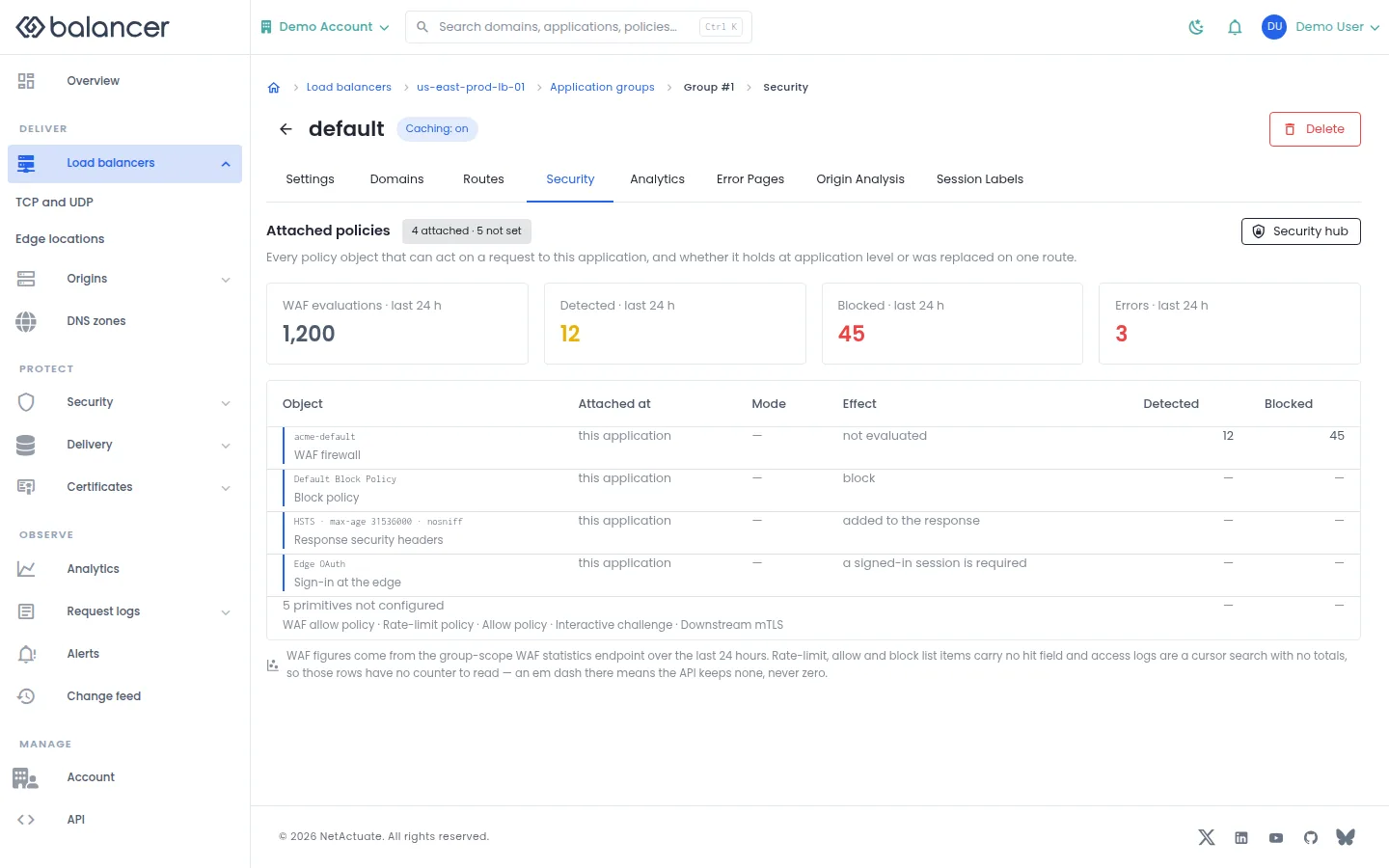
Review security attachments and their effective modes for an application.
- Open an application and select Security.
- Review Object, Attached at, Mode and Effect.
- Select Security hub to open reusable security objects. Verify attachment changes back on the application.
Verify with the API
Use the API host shown in the Balancer portal in place of https://<your-api-host>. Set $BALANCER_API_KEY to your credential for this context. Set $HTTP_LB_ID, $GROUP_ID to the resource identifiers you want to inspect.
curl --fail-with-body --silent --show-error --request GET \
  --url "https://<your-api-host>/http-loadbalancers/$HTTP_LB_ID/groups/$GROUP_ID" \
  --header "x-api-key: $BALANCER_API_KEY"
Expect HTTP 200 with code set to 200. The response includes data.name, data.description, data.version, data.backendPort. Compare the returned configuration with the screen. A successful configuration read does not verify that an edge has applied it.
API reference: Get HTTP group.
Session Labels
No screenshot is available for this screen.
Tag matching sessions with a label key.
- Open an application and select Session Labels. If loading fails, select Retry.
- Select Add rule, enter Label key and When a request matches, then choose State. Select Add rule to save.
- Verify the label key, expression and state in the list.
| Field | Required | Description | Matching API field |
|---|---|---|---|
| When a request matches | Yes | 1-8192 characters. Validation: Expression is required. | requestExpression |
| State | No | Active unless disabled. | isDisabled |
| Label key | Yes | 1-96 characters. Validation: Label key is required. | sessionLabelKey |
Verify with the API
Use the API host shown in the Balancer portal in place of https://<your-api-host>. Set $BALANCER_API_KEY to your credential for this context. Set $HTTP_LB_ID, $GROUP_ID to the resource identifiers you want to inspect.
curl --fail-with-body --silent --show-error --request GET \
  --url "https://<your-api-host>/http-loadbalancers/$HTTP_LB_ID/groups/$GROUP_ID/session-label-rules" \
  --header "x-api-key: $BALANCER_API_KEY"
Expect HTTP 200 with code set to 200. The response includes data.meta, data.data[], data.meta.total, data.meta.offset. Compare the returned configuration with the screen. A successful configuration read does not verify that an edge has applied it.
API reference: List session label rules for an HTTP group.
Application settings
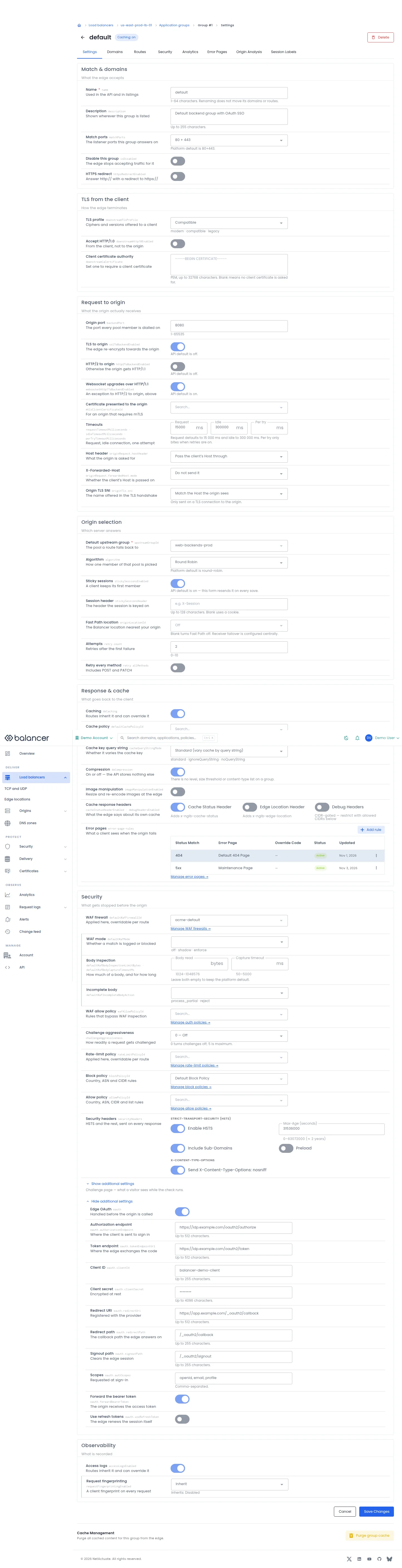
Set listener matching, TLS, origin selection, cache and security defaults inherited by routes.
- Open the application and select Settings.
- Update the relevant fields. Use Show additional settings where needed.
- Select Save Changes, reopen settings and verify the saved values.
- Select Purge group cache to purge cached responses for this application and check the result.
| Field | Required | Description | Matching API field |
|---|---|---|---|
| Status Match | Yes | Non-empty status match. Validation: Status match is required. | statusMatch |
| Error Page | Yes | Existing error page asset. | errorPageAssetId |
| Override Code | No | Whole status code, 400-599. | responseStatusCode |
| Status | No | Enable or disable the rule. | isDisabled |
| Name | Yes | Used in the API and in listings. 1-64 characters. Renaming does not move its domains or routes. | name |
| Description | No | Shown wherever this group is listed. Up to 255 characters. | description |
| Match ports | No | The listener ports this group answers on. Platform default is 80+443. | matchPorts |
| Disable this group | No | The edge stops accepting traffic for it | isDisabled |
| HTTPS redirect | No | Answer http:// with a redirect to https:// | httpsRedirectEnabled |
| TLS profile | No | Ciphers and versions offered to a client. modern , compatible , legacy | downstreamTlsProfile |
| Accept HTTP/1.0 | No | From the client, not to the origin | downstreamHttp10Enabled |
| Client certificate authority | No | Set one to require a client certificate. PEM, up to 32768 characters. Blank means no client certificate is asked for. | downstreamCaCertificate |
| Origin port | Yes | The port every pool member is dialled on. 1-65535 | backendPort |
| TLS to origin | No | The edge re-encrypts towards the origin. API default is off. | sslToBackendEnabled |
| HTTP/2 to origin | No | Otherwise the origin gets HTTP/1.1. API default is off. | http2ToBackendEnabled |
| Certificate presented to the origin | No | For an origin that requires mTLS | mtlsClientCertificateId |
| Request | No | The whole request, including every retry. 1-3600000 | requestTimeoutMilliseconds |
| Idle | No | A connection with nothing on it. 1-3600000 | idleTimeoutMilliseconds |
| Per try | No | One attempt, when retries are on. 1-300000 | perTryTimeoutMilliseconds |
| Websocket upgrades over HTTP/1.1 | No | An exception to HTTP/2 to origin, above. API default is on. | websocketHttp1ToBackendEnabled |
| Host header | No | What the origin is asked for | originRequest.hostHeader |
| Host header value | No | Sent instead of the client's Host. 255 characters | originRequest.hostHeader.value |
| X-Forwarded-Host | No | Whether the client's Host is passed on | originRequest.forwardedHost.mode |
| Origin TLS SNI | No | The name offered in the TLS handshake | originTls.sni |
| SNI value | No | Offered instead of the effective Host. 255 characters | originTls.sni.value |
| Default upstream group | Yes | The pool a route falls back to | upstreamGroupId |
| Algorithm | No | How one member of that pool is picked. Platform default is round-robin. | algorithm |
| Sticky sessions | No | A client keeps its first member. API default is on , this form resends it on every save. | stickySessionsEnabled |
| Session header | No | The header the session is keyed on. Up to 128 characters. Blank uses a cookie. | stickySessionsHeader |
| Fast Path location | No | The Balancer location nearest your origin. Blank turns Fast Path off. Receiver failover is configured centrally. | originLocationId |
| Attempts | No | Retries after the first failure. 0-10 | retry.count |
| Retry every method | No | Includes POST and PATCH | retry.allMethods |
| Caching | No | Routes inherit it and can override it | doCaching |
| Cache policy | No | Applied here, overridable per route | defaultCachePolicyId |
| Cache key query string | No | Whether it varies the cache key. standard , ignoreQueryString , noQueryString | cacheQueryStringMode |
| Compression | No | On or off , the API stores nothing else. There is no level, size threshold or content-type list on a group. | doCompression |
| Image manipulation | No | Resize and re-encode images at the edge | imageManipulationEnabled |
| Image policy | No | The variants this group may serve | imageManipulationPolicyId |
| Path prefix | No | Reserved for image requests, e.g. /img. Up to 64 characters. | imageManipulationPrefix |
| Default variant | No | Used when the URL names no variant. Up to 64 characters. | defaultImageManipulationVariant |
| Cache response headers | No | What the edge says about its own cache | cacheStatusHeaderEnabled , debugHeadersEnabled |
| Error pages | No | What a client sees when the origin fails | error-page-rules |
| WAF firewall | No | Applied here, overridable per route | defaultWafFirewallId |
| WAF mode | No | Whether a match is logged or blocked. off , shadow , enforce | defaultWafMode |
| Body read | No | Set the displayed option.. 1024-1048576 | defaultWafBodyInspectionLimitBytes |
| Capture timeout | No | Set the displayed option.. 50-5000 | defaultWafBodyCaptureTimeoutMs |
| Incomplete body | No | Set the displayed option.. process_partial , reject | defaultWafIncompleteBodyAction |
| WAF allow policy | No | Rules that bypass WAF inspection. The policy id, from Security to auth policies. | wafAllowPolicyId |
| Challenge aggressiveness | No | How readily a request gets challenged. 0-5 | challengeAggressiveness |
| Rate-limit policy | No | Applied here, overridable per route | rateLimitPolicyId |
| Block policy | No | Country, ASN and CIDR rules | blockPolicyId |
| Allow policy | No | Country, ASN, CIDR and list rules. The policy id, from Security to allow policies. | allowPolicyId |
| Security headers | No | HSTS and the rest, sent on every response | securityHeaders |
| Challenge page message | No | Plain text, shown while the check runs. 1024 characters | challengePage.text |
| Challenge page logo | No | An inline data:image URL. 131072 characters , the image is stored inline, not uploaded. | challengePage.imageDataUrl |
| Challenge page CSS | No | Restricted theme overrides. 4096 characters | challengePage.customCss |
| Edge OAuth | No | Handled before the origin is called | oauth |
| Authorization endpoint | No | Where the client is sent to sign in. Up to 512 characters. | oauth.authorizationEndpoint |
| Token endpoint | No | Where the edge exchanges the code. Up to 512 characters. | oauth.tokenEndpointUrl |
| Client ID | No | Set the displayed option.. Up to 255 characters. | oauth.clientId |
| Client secret | No | Encrypted at rest. Up to 4096 characters. | oauth.clientSecret |
| Redirect URI | No | Registered with the provider. Up to 512 characters. | oauth.redirectUri |
| Redirect path | No | The callback path the edge answers on. Up to 255 characters. | oauth.redirectPath |
| Signout path | No | Clears the edge session. Up to 255 characters. | oauth.signoutPath |
| Scopes | No | Requested at sign-in. Comma-separated. | oauth.authScopes |
| Forward the bearer token | No | The origin receives the access token | oauth.forwardBearerToken |
| Use refresh tokens | No | The edge renews the session itself | oauth.useRefreshToken |
| Access logs | No | Routes inherit it and can override it | accessLogsEnabled |
| Request fingerprinting | No | A client fingerprint on every request | requestFingerprintingEnabled |
| Cache Status Header | No | Include cache status response header. | cacheStatusHeaderEnabled |
| Edge Location Header | No | Include edge location response header. | cacheEdgeLocationHeaderEnabled |
| Debug Headers | No | Enable diagnostic headers subject to configured CIDRs. | debugHeadersEnabled |
| Max-Age (seconds) | When HSTS is enabled | 0-63072000 seconds. | securityHeaders.strictTransportSecurity.maxAgeSeconds |
| Include Sub-Domains | No | Apply HSTS to subdomains. | securityHeaders.strictTransportSecurity.includeSubDomains |
| Preload | No | Set the HSTS preload directive. | securityHeaders.strictTransportSecurity.preload |
| Add CIDR | When debug headers are enabled | Allowed source network for debug headers. | debugHeadersCidrs |
| Enable HSTS | No | Enable the HSTS response header. | securityHeaders.strictTransportSecurity.enabled |
| Send X-Content-Type-Options: nosniff | No | Enable the content type protection header. | securityHeaders.contentTypeOptions.nosniff |
Verify with the API
Use the API host shown in the Balancer portal in place of https://<your-api-host>. Set $BALANCER_API_KEY to your credential for this context. Set $HTTP_LB_ID, $GROUP_ID to the resource identifiers you want to inspect.
curl --fail-with-body --silent --show-error --request GET \
  --url "https://<your-api-host>/http-loadbalancers/$HTTP_LB_ID/groups/$GROUP_ID" \
  --header "x-api-key: $BALANCER_API_KEY"
Expect HTTP 200 with code set to 200. The response includes data.name, data.description, data.version, data.backendPort. Compare the returned configuration with the screen. A successful configuration read does not verify that an edge has applied it.
API reference: Get HTTP group.
Create Application Group
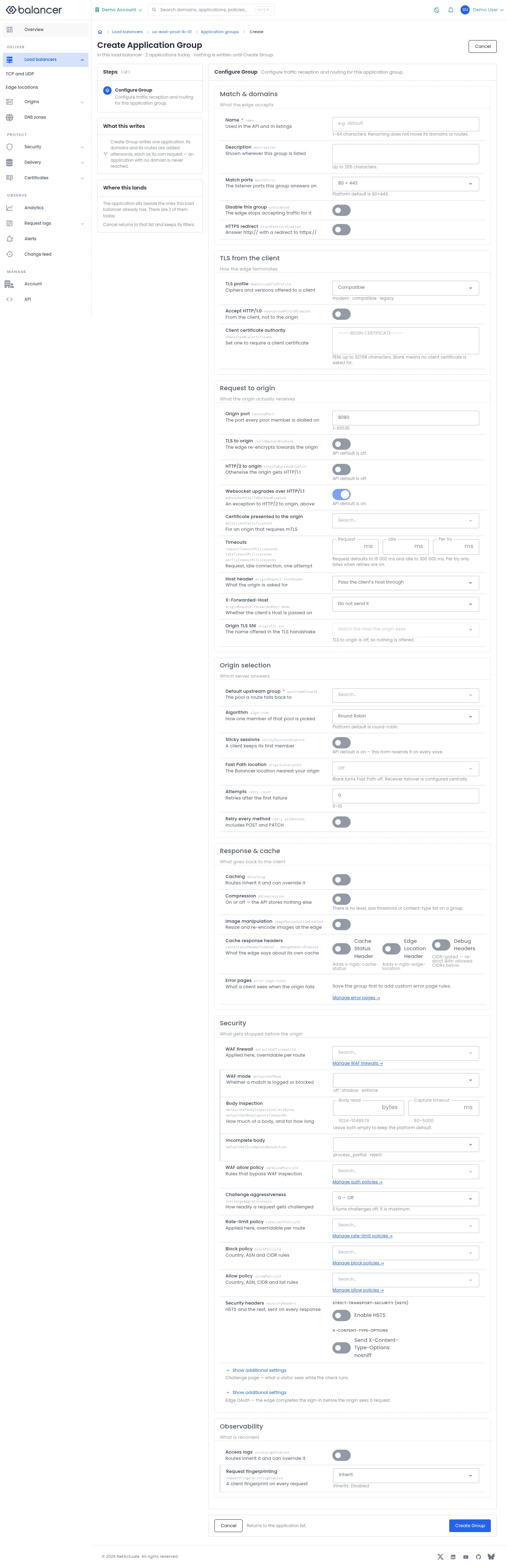
Create an application on an existing HTTP load balancer.
- Open the load balancer and select Add application or Add Group.
- Enter Name and Default upstream group. Review Origin port, Algorithm and the listener and security settings.
- Select Create Group. Verify the application appears on the parent load balancer.
| Field | Required | Description | Matching API field |
|---|---|---|---|
| Name | Yes | Used in the API and in listings. 1-64 characters. Renaming does not move its domains or routes. | name |
| Description | No | Shown wherever this group is listed. Up to 255 characters. | description |
| Match ports | No | The listener ports this group answers on. Platform default is 80+443. | matchPorts |
| Disable this group | No | The edge stops accepting traffic for it | isDisabled |
| HTTPS redirect | No | Answer http:// with a redirect to https:// | httpsRedirectEnabled |
| TLS profile | No | Ciphers and versions offered to a client. modern , compatible , legacy | downstreamTlsProfile |
| Accept HTTP/1.0 | No | From the client, not to the origin | downstreamHttp10Enabled |
| Client certificate authority | No | Set one to require a client certificate. PEM, up to 32768 characters. Blank means no client certificate is asked for. | downstreamCaCertificate |
| Origin port | Yes | The port every pool member is dialled on. 1-65535 | backendPort |
| TLS to origin | No | The edge re-encrypts towards the origin. API default is off. | sslToBackendEnabled |
| HTTP/2 to origin | No | Otherwise the origin gets HTTP/1.1. API default is off. | http2ToBackendEnabled |
| Certificate presented to the origin | No | For an origin that requires mTLS | mtlsClientCertificateId |
| Request | No | The whole request, including every retry. 1-3600000 | requestTimeoutMilliseconds |
| Idle | No | A connection with nothing on it. 1-3600000 | idleTimeoutMilliseconds |
| Per try | No | One attempt, when retries are on. 1-300000 | perTryTimeoutMilliseconds |
| Websocket upgrades over HTTP/1.1 | No | An exception to HTTP/2 to origin, above. API default is on. | websocketHttp1ToBackendEnabled |
| Host header | No | What the origin is asked for | originRequest.hostHeader |
| Host header value | No | Sent instead of the client's Host. 255 characters | originRequest.hostHeader.value |
| X-Forwarded-Host | No | Whether the client's Host is passed on | originRequest.forwardedHost.mode |
| Origin TLS SNI | No | The name offered in the TLS handshake | originTls.sni |
| SNI value | No | Offered instead of the effective Host. 255 characters | originTls.sni.value |
| Default upstream group | Yes | The pool a route falls back to | upstreamGroupId |
| Algorithm | No | How one member of that pool is picked. Platform default is round-robin. | algorithm |
| Sticky sessions | No | A client keeps its first member. API default is on , this form resends it on every save. | stickySessionsEnabled |
| Session header | No | The header the session is keyed on. Up to 128 characters. Blank uses a cookie. | stickySessionsHeader |
| Fast Path location | No | The Balancer location nearest your origin. Blank turns Fast Path off. Receiver failover is configured centrally. | originLocationId |
| Attempts | No | Retries after the first failure. 0-10 | retry.count |
| Retry every method | No | Includes POST and PATCH | retry.allMethods |
| Caching | No | Routes inherit it and can override it | doCaching |
| Cache policy | No | Applied here, overridable per route | defaultCachePolicyId |
| Cache key query string | No | Whether it varies the cache key. standard , ignoreQueryString , noQueryString | cacheQueryStringMode |
| Compression | No | On or off , the API stores nothing else. There is no level, size threshold or content-type list on a group. | doCompression |
| Image manipulation | No | Resize and re-encode images at the edge | imageManipulationEnabled |
| Image policy | No | The variants this group may serve | imageManipulationPolicyId |
| Path prefix | No | Reserved for image requests, e.g. /img. Up to 64 characters. | imageManipulationPrefix |
| Default variant | No | Used when the URL names no variant. Up to 64 characters. | defaultImageManipulationVariant |
| Cache response headers | No | What the edge says about its own cache | cacheStatusHeaderEnabled , debugHeadersEnabled |
| Error pages | No | What a client sees when the origin fails | error-page-rules |
| WAF firewall | No | Applied here, overridable per route | defaultWafFirewallId |
| WAF mode | No | Whether a match is logged or blocked. off , shadow , enforce | defaultWafMode |
| Body read | No | Set the displayed option.. 1024-1048576 | defaultWafBodyInspectionLimitBytes |
| Capture timeout | No | Set the displayed option.. 50-5000 | defaultWafBodyCaptureTimeoutMs |
| Incomplete body | No | Set the displayed option.. process_partial , reject | defaultWafIncompleteBodyAction |
| WAF allow policy | No | Rules that bypass WAF inspection. The policy id, from Security to auth policies. | wafAllowPolicyId |
| Challenge aggressiveness | No | How readily a request gets challenged. 0-5 | challengeAggressiveness |
| Rate-limit policy | No | Applied here, overridable per route | rateLimitPolicyId |
| Block policy | No | Country, ASN and CIDR rules | blockPolicyId |
| Allow policy | No | Country, ASN, CIDR and list rules. The policy id, from Security to allow policies. | allowPolicyId |
| Security headers | No | HSTS and the rest, sent on every response | securityHeaders |
| Challenge page message | No | Plain text, shown while the check runs. 1024 characters | challengePage.text |
| Challenge page logo | No | An inline data:image URL. 131072 characters , the image is stored inline, not uploaded. | challengePage.imageDataUrl |
| Challenge page CSS | No | Restricted theme overrides. 4096 characters | challengePage.customCss |
| Edge OAuth | No | Handled before the origin is called | oauth |
| Authorization endpoint | No | Where the client is sent to sign in. Up to 512 characters. | oauth.authorizationEndpoint |
| Token endpoint | No | Where the edge exchanges the code. Up to 512 characters. | oauth.tokenEndpointUrl |
| Client ID | No | Set the displayed option.. Up to 255 characters. | oauth.clientId |
| Client secret | No | Encrypted at rest. Up to 4096 characters. | oauth.clientSecret |
| Redirect URI | No | Registered with the provider. Up to 512 characters. | oauth.redirectUri |
| Redirect path | No | The callback path the edge answers on. Up to 255 characters. | oauth.redirectPath |
| Signout path | No | Clears the edge session. Up to 255 characters. | oauth.signoutPath |
| Scopes | No | Requested at sign-in. Comma-separated. | oauth.authScopes |
| Forward the bearer token | No | The origin receives the access token | oauth.forwardBearerToken |
| Use refresh tokens | No | The edge renews the session itself | oauth.useRefreshToken |
| Access logs | No | Routes inherit it and can override it | accessLogsEnabled |
| Request fingerprinting | No | A client fingerprint on every request | requestFingerprintingEnabled |
| Cache Status Header | No | Include cache status response header. | cacheStatusHeaderEnabled |
| Edge Location Header | No | Include edge location response header. | cacheEdgeLocationHeaderEnabled |
| Debug Headers | No | Enable diagnostic headers subject to configured CIDRs. | debugHeadersEnabled |
| Max-Age (seconds) | When HSTS is enabled | 0-63072000 seconds. | securityHeaders.strictTransportSecurity.maxAgeSeconds |
| Include Sub-Domains | No | Apply HSTS to subdomains. | securityHeaders.strictTransportSecurity.includeSubDomains |
| Preload | No | Set the HSTS preload directive. | securityHeaders.strictTransportSecurity.preload |
| Add CIDR | When debug headers are enabled | Allowed source network for debug headers. | debugHeadersCidrs |
| Enable HSTS | No | Enable the HSTS response header. | securityHeaders.strictTransportSecurity.enabled |
| Send X-Content-Type-Options: nosniff | No | Enable the content type protection header. | securityHeaders.contentTypeOptions.nosniff |
Verify with the API
Use the API host shown in the Balancer portal in place of https://<your-api-host>. Set $BALANCER_API_KEY to your credential for this context. Set $HTTP_LB_ID to the resource identifiers you want to inspect.
curl --fail-with-body --silent --show-error --request GET \
  --url "https://<your-api-host>/http-loadbalancers/$HTTP_LB_ID/groups" \
  --header "x-api-key: $BALANCER_API_KEY"
Expect HTTP 200 with code set to 200. The response includes data.meta, data.data[], data.meta.total, data.meta.offset. Compare the returned configuration with the screen. A successful configuration read does not verify that an edge has applied it.
API reference: List HTTP groups.
Related
- Task guide: groups routes.
- Task guide: error pages.
- Concepts: http load balancers.
- Delete an HTTP LB group.
- Delete a route.
- List HTTP groups.
- Get HTTP group.
- List domains for an HTTP group.
- List custom error page rules for an HTTP group.
- List origin analysis rules for an HTTP group.
- List routes for an HTTP group.
- Get HTTP group route.
- List basic auth users for a route.
- List custom error page rules for an HTTP route.
- List upstream bindings for a route.
- List session label rules for an HTTP group.
- Update an HTTP group configuration.
- Update an HTTP group route configuration.
- Creates a new application group within an HTTP load balancer.
- Adds a domain to an HTTP group.
- Create a custom error page rule for an HTTP group.
- Create an origin analysis rule for an HTTP group.
- Creates a new route for an HTTP group.
- Adds a basic auth user to a route.
- Create a custom error page rule for an HTTP route.
- Adds an upstream binding to a route for per-route traffic splitting.
- Create a session label rule for an HTTP group.
- Query managed access logs for an HTTP group.
- Query managed access logs for an HTTP route.